

Blue Yonder Category Suite release reviews (2016.1-2024.4)
Everything you need to know about the release updates for Blue Yonder Category Management Suite, which provides specialized tools for retailers and suppliers to collaborate and support the needs of category, space, and assortment planning.
These guides are brought to you by Crisp Cantactix experts who excel at moving CPG and retail companies from manual processes to a cutting-edge category management approach, using integrated Blue Yonder and Crisp solutions and guidance.

Your Blue Yonder Category Management guides:
Blue Yonder Category Suite 2024.4
-
What you need to know
As Blue Yonder continues to roll out updates across its SaaS-based supply chain tools, this latest release focuses on transforming planning processes with advanced AI and machine learning capabilities. These innovations aim to improve end-to-end planning across retail and manufacturing industries, ensuring real-time visibility, smarter decision-making, and more automation across the supply chain. With the new Cognitive applications, such changes will begin to find their way into the SaaS Category Management tools in 2025.
For desktop-based users, this release highlights Blue Yonder’s commitment to continue providing functional enhancements, issue resolution, and performance improvements to the Category Management Desktop Suite. They hope that users will see the advanced capabilities of the SaaS offerings, compelling them to migrate from the desktop applications on their own. They have no plans to discontinue support of the desktop suite to force the customers’ hand.
One of the most significant changes coming with the release of 2024.4 is the phase-out of Data Manager (DM) and CKB Console, which will no longer be supported. If you’re still using DM, it’s time to start preparing for a transition. This change was first announced with the 2024.1 release, and now, with the end of product development officially arriving, Blue Yonder is continuing to push users toward modernized workflows through tools like Open Access. Critical end-user functionality from Data Manager has already been integrated into Open Access, and work continues to do the same for the Console.
The 2024.4 release introduces new fields in Space and Floor Planning, but they’re not generic “catch-all” fields like Description or Value. Instead, these fields are purpose-built to store specific types of data. Blue Yonder has analyzed the types of data commonly saved in the Description and Value fields and now offers dedicated fields to hold such data. Additional fields have also been added to support data aggregations within Space and Floor Planning and to support the coming Cognitive applications.
Functional enhancements have also been added to Space Planning and Floor Planning. For CPG customers working with multiple retailers, this release features the ability to have multiple PMD files and switch them dynamically without closing Space Planning. This shift allows users to customize field names for each retailer’s planograms and load them when needed, streamlining workflows for those managing diverse accounts. In Floor Planning, the WebSocket Database Connection has been added. This will allow a user to connect a local instance of Floor Planning to a SaaS-hosted instance of the CKB database.
Beyond these functional updates, sometimes it’s the little things that make the biggest impact. One minor but practical update in both Space Planning and Floor Planning is the ability to shrink the ribbon into a simplified version, freeing up more screen space for planograms and floorplans. This is a welcome change for users who value a cleaner, more focused workspace, especially when dealing with detailed planograms.
In addition, Planogram Generator continues to evolve with multiple new features that enhance merchandising options, helping users meet unique requirements without manual workarounds. Additionally, an enhancement has been added to help manage the impact of a minor revision to those implementing the changes in the store. These small but impactful updates demonstrate that the best tools continue to get better, making everyday tasks more efficient and effective.
-
What’s New in 2024.4
A quick overview of changes across the suite for busy readers:
- Assortment Optimization: Focused on stability with no new features but multiple bug fixes, including database compatibility and error resolution.
- Category Knowledge Base: Introduced Oracle 21c and 23ai support, schema enhancements, and advanced custom processing for Lifecycle Management.
- Floor Planning: Expanded field catalog, streamlined interface options, and WebSocket Database Connectivity.
- Space Planning: Expanded field catalog, streamlined interface options, added flexibility with multiple PMD files for diverse configurations.
- Planogram Generator: Enhancements in merchandising flexibility, preview highlights, and the ability to manage scope during revisions.
- Space Automation Professional: Updated to support Visual Studio 2022 and added flexibility with WebSocket Database Connectivity.
- Strategic Assortment: Store Specific Assortments, enhanced import for new products, and additional fields to better support substitution data.
-
Space Planning
Space Planning continues its focus on adaptability and ease of use in the 2024.4 release. Based on user requests, this version introduces the ability to keep multiple PMD files, each configured with different field name overrides, and apply them dynamically when needed. This can now be accomplished through a Space Planning dialog that allows you to select the desired file. Field name overrides are applied immediately. There is no longer a need to close Space Planning and manually copy in the desired file.
An update to the BCG shared controls also enables new themes, such as the Office 2022 option, which includes 4 different themes. Themes can now be changed on the Display Tab of the Settings dialog where one would naturally think to find such settings rather than going through the status bar. Updates have also been made to allow the ribbon to run in a collapsed mode allowing for more room for working through planograms. Optionally, labels can now be displayed on the quick access toolbar which can help better identify a button as many icons appear similar.
Space Planning 2024.4 also benefits from an expanded field catalog. These additional fields serve a number of purposes. Some have been added in anticipation of the new Cognitive applications coming in 2025. Others were added to support pre-aggregation of platform data or based on Blue Yonder’s review of data commonly held in description and value fields. New static fields have been added to hold such data, which can free up room for many users in these flex fields. These fields have not been added to the Space Planning dialogs but are accessible through tables and property lists.
Though there is not a significant number of new features, Space Planning continues to evolve based on user feedback, the introduction of new technologies, and the recognition of the need to store additional data.
-
Floor Planning
Floor Planning 2024.4 features the addition of the WebSocket Database Connection. This connection allows users to run Floor Planning locally on their PC or laptop and connect to a CKB database hosted on the BY Cloud. This change means the user does not have to access Floor Planning via Citrix in order to access the floorplans in their database. This feature was added to Space Planning in the 2023.1 release and is now available for Floor Planning and Space Automation Professional.
This release of Floor Planning benefits from an expanded field catalog. These additional fields have been added for multiple purposes. Some fields may have been added in anticipation of the new Cognitive applications coming in 2025. Other fields were added to support the pre-aggregation of performance data. This is a Platform Data Cloud feature available to those with Blue Yonder Cloud Implementations. The Platform Data Cloud can pre-aggregate data on the planogram and floorplan performance levels for up to 6 time periods and store the results in the relevant objects in CKB.
Based on Blue Yonder’s review of data commonly held in description and value fields, other fields were added. New static fields have been added to hold such data, which can free up room for many users in these flex fields. These fields have not been added to the Floor Planning dialogs but are accessible through tables and property lists. No plans have been made to automatically move any such data. Users will need to determine how the new fields will be used and how to populate them.
An update to the BCG shared controls also enables new themes, such as the Office 2022 option, which includes 4 different themes. Themes can now be changed on the Display Tab of the Settings dialog where one would naturally think to find such settings rather than going through the status bar. Updates have also been made to allow the ribbon to run in a collapsed mode allowing for more room for working through planograms.
Though the enhancement list is not long, these changes represent significant architectural updates to Floor Planning with usability and future-proofing in mind.
-
Category Knowledge Base (CKB)
Category Knowledge Base has received a notable upgrade that will provide more functionality and data support for Category Management. This release introduces new database schema enhancements designed to streamline the exchange of data between Space Planning, Floor Planning, and the CKB database. To support this, numerous fields have been added to the following tables:
- Ix_spc_planogram
- Ix_spc_product
- Ix_spc_performance
- Ix_flr_floorplan
- Ix_flr_fixture
- Ix_flr_performance
For CKB Oracle users, this release now supports Oracle 21c and 23ai database servers as well as Oracle 19c client installations, bringing the application in line with modern data handling standards. Lifecycle Management now supports automated custom processes that will execute as a user creates a copy or version of a floorplan or planogram. This change provides more opportunities for greater automation and efficiency across connected applications.
The Open Access application now supports Interface Configurations and Job Scheduling traditionally configured in Console. An interface can now be configured and mapped to a host system and jobs scheduled or manually executed via Open Access or a Batch Server.
Data Manager and Console have remained the same for numerous releases as critical functionality migrated to Open Access. With the 2024.4 release, version checking has been removed from both of these applications. As Blue Yonder releases new versions of the rest of the Category Management Suite, Data Manager and Console will continue to function until a breaking change occurs.
A breaking change could occur through an update to Windows, SQL, Oracle, or even the Category Management Suite itself. Though Blue Yonder has no plans to make any such changes, one may become necessary, and neither the Data Manager nor Console will be updated to address it. It is time for all to consider how to move their custom functionality in Data Manager to another tool. Cantactix can assist you with that task.
-
Assortment Optimization
The Assortment Optimization application in the 2024.4 release focuses on refining existing features’ stability and performance. While there are no new feature rollouts in this update, several key issues reported by users have been addressed, improving the tool’s reliability. These fixes target database integration errors and unexpected application crashes, ensuring smoother workflows for users handling large datasets or complex assortment projects. Users upgrading to this version will need new activation codes, a minor but essential step to enable access to the updated system.
-
Strategic Assortment
Strategic Assortment continues to evolve with the introduction of Concentric Assortments. Some users will recognize this as the assortment wedge. This addition allows Strategic Assortment to sort a list of planograms by size, calculate an assortment for each size break, and ensure the Assortment at each size break is represented in the next larger size. This will help ensure consistency of product assortments across a dynamic range of available size breaks.
New fields have also been added to Strategic Assortment, though these have a specific purpose. 6 Fields have been added to better support and more clearly define the data involved with product substitution. Previously, this data was held in a single field. Now, there are separate fields to hold the base sales data, the source of that data, the amount of the base sales that will be substituted, the amount of the base sales that will be cannibalized, the sales that will be lost, and the sales that will be added. These fields will be essential in helping users make the best use of product substitutes.
Enhancements have also been added to the data import for new products, allowing users to import performance information from an outside source like Excel for products with no data. There were limitations on this previously. Also, validation options have been added to allow users to halt the import of new data if configured fields do not have valid data to ensure new products have all the necessary data going into the assortment calculations. Limited Reviews and Minor Updates have also been added as new activity types.
-
Space Automation Professional
Space Automation Professional has transitioned to support Visual Studio 2022 in the latest release. Visual Studio 2017 and 2019 are no longer supported. This change reflects a shift toward more robust and efficient script-building capabilities, crucial for users automating complex tasks. Those using 2017 or 2019 should consider migrating Visual Studio to version 2022 if they intend to upgrade Space Automation Pro.
Additionally, the WebSocket Database Connection has been added to Space Automation Pro. This update will allow a user to connect a local instance of Space Automation Pro with a SaaS-hosted instance of the CKB database. This addition allows a user to develop SA Pro scripts without having to connect to it via Citrix. The activation codes have also been updated for this version in keeping with Blue Yonder’s efforts to keep the software secure.
-
Planogram Generator
This release brings exciting enhancements to Planogram Generator, focusing on merchandising flexibility and precision. New stacking options allow users to optimize shelf space with the ability to stack products on or behind others. Also, products can now be placed in front of obstructions which previously might have impeded the merchandising space from behind.
Side capping in the template can now be carried forward into the target planogram, whether the cap is included in the position or a secondary orientation. This update solves the issue of side caps being merchandised in the target as an equal number of front-facing positions. When using the Revision method, the area around a removed item can now be isolated to a set number of positions. This update will allow the items closest to the newly opened space to fill in, reducing the overall impact on the planogram and, ultimately, on the labor needed at the store level to carry out the change. This change was made to help address the need to manage the impact of a revision on the store.
Enhancements were also made to streamline the use of the highlight tool during the generation preview. Though highlights were already supported, they were displayed to the user in a long, unsorted list. A button now accesses a much more navigable dialog, making it much easier to select the desired highlight. The name of the currently displayed highlight will also appear on the button, helping the user keep track of what they are analyzing. Planogram Generator continues to be a cornerstone application for Blue Yonder, featuring several new enhancements as it continues to evolve. These changes are particularly valuable for teams looking to maximize efficiency in high-volume retail environments.
-
Our take
The 2024.4 release marks a step forward for the Blue Yonder Category Management Suite, focusing on enhancing stability, customization, and usability. Key highlights include the improved database support for the Category Knowledge Base, expanded field catalogs in Floor and Space Planning, and more flexible merchandising options in the Planogram Generator. Strategic Assortment’s localization capabilities, concentric assortments, and enhanced data import further position this suite as a leader in precision retail management.
Cantactix recommends prioritizing upgrades for teams reliant on automation and localized planning or those needing to take advantage of the additional fields. We stand ready to assist you with training, support, and consulting, which could include facilitating the use of automation in new fields to help you move your data. Training sessions should focus on new stacking methodologies, automation processes, and configuration options for ribbons and settings. Overall, this release addresses both macro and micro-level operational challenges, providing meaningful benefits for retailers and suppliers alike.
As you navigate the updates in the 2024.4 release, don’t forget that CXU offers on-demand training tailored to help you make the most of Blue Yonder tools like Planogram Generator and Space Planning. Whether you’re new to Blue Yonder or looking to refamiliarize yourselves with the applications, Cantactix University provides video tutorials and practical guides to accelerate your team’s adoption of Space Planning and Planogram Generator. Whether you’re looking to streamline workflows or expand your technical expertise, CXU is your partner in optimizing Blue Yonder’s capabilities.
Blue Yonder Category Suite 2024.1
-
What you need to know
The Blue Yonder Category Management 2024.1 release signals a major stride in the company’s efforts to move their business to the cloud. 2024.1 introduces the first glimpses of the Platform Data Cloud (PDC) backed by Snowflake. The Platform Data Cloud represents the data store of the future for Blue Yonder, underpinning a platform that will ultimately support and interchange data between all products in the Blue Yonder ecosystem.
2024.1 features a set of inbound integrations to CKB for Product, Store, Cluster, and Performance from the PDC and an outbound feed for Product Eligibility by Store that will return to the PDC. The PDC will feature data transfers set up in a standardized fashion so data from any application can be shared with any other. BY has shared that they have much on their roadmap to enhance these capabilities, and 2024.1 is but a taste of what is to come for those customers in the BY Cloud.
For those not in the BY Cloud, the release is not as impactful. Blue Yonder is prioritizing their cloud migration by shifting their focus towards enabling desktop applications to access CKB on the cloud, while slowing down development of these applications. Though a slowdown in development is an expected side effect of BY redirecting development resources to work on cloud-based projects from the desktop applications, the result remains.
Space Planning (SP), Floor Planning (FP), and Space Automation Pro (SA Pro) all had enhancements made to the Websocket capability enabling them to access a BY SaaS instance of CKB with little more done to the application. A new API and 75 new endpoints were added to Category Management Services and the last of the missing functionality from CKB Console was added to Open Access (OA) strengthening BY’s position in the cloud. Planogram Generator (PG) was enhanced with new actions and updates to existing actions as BY continues supporting automated workflows.
We’ve also been notified that the 2024.4 release tentatively scheduled for December of this year will be the last release to feature CKB Data Manager or CKB Console as they will be officially retired. Open Access will be the supported platform moving forward. Those users with customizations in Data Manager will need to begin considering their next steps. The final release of Data Manager will have version checking removed so it can be used with subsequent BY releases for the foreseeable future. However, it will not be officially supported, nor will it be updated or patched if there are issues.
Alerts
- Activation Codes have been updated for all applications in the suite.
- SQL Server 2017 is no longer supported. Support for SQL Server 2022 has been added, and Support for SQL Server 2019 remains.
- Oracle 19c is the only version of Oracle that will be supported. Though Oracle 23c has been released, it does not have a 32-bit client, which is a requirement for BY applications.
- Support for Revit 2024 has been added. Floor Planning also still supports Revit 2022 and 2023.
- CKB Data Manager and CKB Console official retirement announced for 2024.4, scheduled tentatively for December of 2024.
-
For on-prem users
In light of the latest Blue Yonder Category Management release, it’s clear that the future of retail and category management lies in innovative, scalable solutions. The recent release offers minimal advancements for On-prem customers using CKB or flat file systems, underscoring Blue Yonder’s shift towards enhancing their SaaS platform. This pivot to SaaS innovation leaves On-prem customers seeking more advanced planogramming and floor planning tools.
Cantactix steps into this gap with its software solutions, designed to augment your planogramming capabilities significantly. MissionControl leverages automation and a suite of powerful tools to streamline the planogramming process, making it faster, more efficient, and capable of handling complex retail and floor planning needs. It’s an ideal upgrade for those looking to extend beyond the limitations of On-Prem systems, ensuring that your category management remains cutting-edge without relying on new tools from Blue Yonder’s latest releases.
-
For Blue Yonder cloud users
For BY Cloud customers, the recent R&D efforts have focused on enhancing the infrastructure to better integrate CKB with the broader BY supply chain solutions, including seamless integration with BY’s Platform Data Cloud—Snowflake. This includes developments in SaaS-only Strategic Assortment and Space applications, with notable enhancements in the Planogram Generator, especially around merchandising in chests.
The phase-out of Data Manager and the change in the data type for the Store Number field are critical considerations. These changes signal the need for a transition to more modern solutions. Cantactix can facilitate this transition smoothly, offering pathways to integrate existing functionalities with new capabilities provided by MissionControl. This ensures a seamless upgrade and continued excellence in category management operations.
Whether you’re facing the end of support for Data Manager or looking to expand your planogramming capabilities beyond the latest Blue Yonder release, Cantactix’s solutions offer a robust, forward-looking alternative. With Cantactix software solutions, retailers can embrace the future of Category Management, leveraging automation and advanced data analytics to stay ahead in a rapidly evolving retail landscape.
-
Space Planning
Development on the Category Management Suite has slowed down in recent years due to the shift in Blue Yonder’s vision to move to a SaaS-
That said, some minor improvements were made to the 2024.1 version of Space Planning if you’re on BY SaaS. Performance improvements were made to the Websocket connection using multi-threaded object serialization and optimized data format conversions. Error handling and connection recovery methods were added to improve stability. Functionality of the Websocket was extended so it now supports Planogram Exchange Management (PEM), Lifecycle Management (LCM), and the Space Planning COM Automation Call for FetchProductIKBDBKeys.
Also, the base authorization level for the Planogram Generator Edit Action List command was lowered from 9 to 8 to give administrators an additional activation level for the configuration of PG users. The changes to Space Planning were small and localized, but development does continue on BY’s flagship CMS applications.
-
Floor Planning
Blue Yonder has made some minor but impactful updates to Floor Planning for 2024.1, again if you’re in BY SaaS. The main enhancement is that the Web Socket Database Connection Functionality introduced last year for Space Planning will now be available in Floor Planning. This enables any customer with a hosted CKB Database in a Blue Yonder Azure environment the ability to connect directly to an installation of Floor Planning on a local device. This allows the implementation of Floor Planning to be more flexible as users can connect to a SaaS version of CKB locally without having to rely solely on accessing Floor Planning via Citrix.
For any customers using or considering the use of Revit to tie into your Floor Planning process, the latest version of Revit 2024 has been certified for use with the application. Past versions of Revit, including 2022 and 2023, will also continue to be compatible with the latest release. By introducing support for Revit 2024, BY has made additional API Integration’s available for sending and receiving data across both platforms.
-
Category Knowledge Base (CKB)
2024.1 is the first release of the Blue Yonder suite with a connection to the Platform Data Cloud (PDC). For customers in the Blue Yonder cloud who are able to take advantage of this capability, the 2024.1 release features a set of integrations which will allow CKB to access data stored in Snowflake, the database technology underpinning the Platform Data Cloud.
Though this release is limited in what it offers in terms of the number of integrations it is capable of, it gives us a glimpse into the future of the Blue Yonder vision with some first real, tangible steps. This release will allow CKB to receive a subset of Product, Store, Cluster, and Performance data from the PDC and feed back item eligibility data per store based on merchandised planograms. Much more work is planned on the BY roadmap for future releases, and 2024.1 marks a first step into this new platform.
Some schema changes have been made to the CKB database for 2024.1. Most notably, the data type for the Store Number field has been changed to Varchar(80). This will enable users to store alphanumeric values for store numbers moving forward, which is more consistent with the way other Blue Yonder applications outside the CMS Suite currently work.
Please be aware that this could cause disruption to the way some current custom store integrations may work. If code has been written in such a way that it depends on the Store Number being in Integer, which is what it formerly was, then a sudden change from an Integer to a VarChar could cause a change in the behavior of that code.
Also, be aware that 2024.1, which was just released and 2024.4, tentatively scheduled for release in December of 2024, will be the final releases of Blue Yonder CKB Data Manager and CKB Console. Blue Yonder has officially announced the retirement of these applications. Please be aware, this is not the retirement of CKB, but the retirement of the older desktop management tools. CKB administered by Open Access is the officially supported platform moving forward.
This does not mean they will be unsupported, technically. The final release will remove any version checking ensuring users can continue to use them with future BY releases. However, BY will not make any patches or any additional developments to keep them viable. They will be unofficially supported until a change to Windows, SQL, or Oracle renders them unusable.
Please use this time to begin considering a transition plan. This could be a shift to Open Access or the Blue Yonder Cloud. This could also be a shift to MissionControl and/
-
Open Access
For 2024.1, the main Open Access landing page has been updated to a new React JS-
Open Access has also been updated with the ability to define Planogram Generator Scenarios. These allow a user to set up a request for Planogram Generator to run with minimal expertise or interaction necessary. An administrator can set up the various inputs and a user can select what they want and associate them to a new request streamlining the process for users unfamiliar with PG.
Open Access has also been updated with the settings necessary to configure Lifecycle Management. This was formerly done in CKB Console. This is some of the last of the major functionalities needed in Open Access to take over Console as a fully functional management system allowing Blue Yonder to make the decision to retire Console.
-
Category Management servicees
The Category Management Services continue to be enhanced providing a new API and 75 new API endpoints. For 2024.1, these include:
- Materials – 32 new endpoints supporting Parts and Components
- Planogram Exchange Management (PEM) – 13 new endpoints
- Planogram – 5 new endpoints supporting PG Processing for Equipment Import
- System – 25 new endpoints supporting LCM, DBStatus Maintenance, and Job Execution
- User – A new endpoint allowing for the retrieval of a list of Web and CKB Users
Also, Category Management Services has been updated to use .Net Core 6 to extend the life of the .Net Core version used.
-
Space Automation Pro
For the 2024.1 release, the Web Database Configuration for Space Automation Pro has been updated. SA Pro will now use the LIAM Authenticated Websocket connection to connect to the database allowing it to be installed and run from a remote machine again providing an alternative to using the application via Citrix. This update replaces the older Open Access Web API connection which has been discontinued as of this release. No other features were added, though a number of customer-
-
Planogram Generator
Unlike other applications in the suite, Planogram Generator has received quite a bit of development for the 2024.1 release.
PG Edit Action List command authorization min level 8
The default authorization level for editing a PG Action List has been lowered from 9 to 8. When upgrading, the existing ProSpace.aut file will retain the user’s current authorization level for that command. An administrator with level 10 access can set the authorization to 8, 9, or 10 and deploy the AUT file to the rest of the organization. During a new installation, the command will be set to level 8 by default.
New Actions
Can Define Maximum Number of Positions on Fixtures
In the Merchandising Options action under the Settings Phase, there is now the option to set the Maximum Positions for each uncombined shelf. This can be set to a specific number to apply to all shelves, or a formula can be created to filter to specific shelves. When multiple shelves are combined, the number set here will be the maximum number across all combined fixtures. This will work great for pallets, or situations where you need to control the number of items that are placed on shelves.
Note that this does not technically stop additional positions from being added to those fixtures. It simply flags the additional positions as being overfilled, which will allow relax or boost actions to attempt to move them to a fixture that does not meet the maximum number.
Limit Depth & Vertical Stacking
A new Reduce Units Deep and High action will be available in the Final Phase. This action will use the target inventory levels to reduce units deep and/or reduce units high. To achieve this, the position level MerchY and/or MerchZ settings will be set to Manual and values that limit the capacity to the Target Inventory will be set as maximums. When the planogram level capacities are being used within an organization to determine the ordering level, this feature is designed to show the desired value, rather than the full capacity of the position.
Enhancements to Existing Actions
STOP Action Renamed
The STOP action available in almost all phases has been renamed to Bypass Remaining Actions. There is no change to the purpose or functionality of the action
,; it has been simply renamed to better represent what it does. It continues to ignore any actions that follow it in the Action List and generation halts.Copy Data to Target
Within the Copy Data to Target action, there have always been options to Use A
auxiliary and to Use Anchor. When using an auxiliary template, products that only resided on the auxiliary would have data from the anchor’s primary template position copied across to the target. The functionality has been improved such that when a product only exists on the auxiliary template, those data points will be copied over to the target. The data for anchors will continue to come from the primary unless the Use Auxiliary option is selected.Copy Tags to Target
Within the Copy Tags to Target action there are now options to use the template anchor product tags or use the auxiliary product tags. This action will copy all tag fields over and
,there is no option to filter. Caution must be used if copying the tags from the auxiliary as it will replace all 16 tag fields in the target with the tags from the auxiliary. To copy individual tags, use the Copy data to target action.Use Formulas in Relax and Boost Actions
Numerous releases ago, BY added the formula builder in the Product Phase to be used when including and/or excluding products. The functionality has now been extended to the Relax and Fill Out Phases.
There are now options to use a Template or Target formula to reduce/boost towards. This lets you use the same logic that may have been used to initially include the products during the Products Phase.
Simple vs Advanced Stacking in Chests
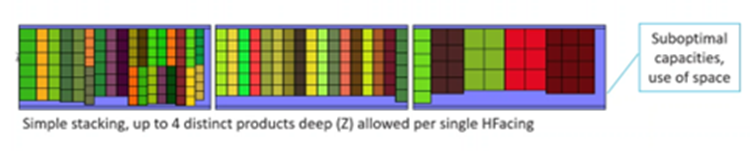
PG now offers more complex patterns for chest stacking. The current functionality has been renamed to “Simple”, while a new “Advanced” option adds multiple layers to optimize the chest fixture.
Below is a sample of the current Simple method. Products can be stacked behind other products, but the width of positions must align with the lead product.

Below is a sample of the new Advanced method. Products can still be stacked behind other products, however, the number of products stacked behind is now configurable by selecting from the options available.
In the Advanced method, multiple patterns can be enabled. If multiple actions are being used, the allowed patterns from each action are cumulative. When Advanced stacking options are selected, Simple stacking options are ignored.
Resequencing can be allowed for better fit to correct overflows. This will change the order of the positions for the template flow to better optimize the space requirements. Caution should be taken when this option is selected, as the best space allotment may not align with the merchandising strategy.
With this being used in a CHEST fixture, top and side capping are still not available. Depth capping however is applicable, and a maximum number of caps can be set in the action. Advanced stacking will set positions to Manual like PG does when banding, which means that actions like “Spread Evenly” will not be applicable.
-
Assortment Optimization
For the first time in several releases, Assortment Optimization 2024.1 contains some new features. Though there are not many, it is encouraging to see continued development and enhancement of the product. 2024.1 features the ability to set a custom location for the Framework User Settings File, which is the Assortment Optimization version of an INI file. This is consistent with Space and Floor Planning’s ability to set custom locations for such files and will provide some flexibility in environments where this file is maintained by an admin and needs to be consistently backed up or updated. There is also a new feature which will allow a user to remove all nodes from a product tree which have no products assigned to them with a single button click. In addition to this, BY continues to work on the health of the application as they have in past releases listing 9 customer-
-
Our take
The 2024.1 release offers benefits to those who have a CKB implementation in the BY Cloud, who use Planogram Generator, or who plan to develop solutions using or otherwise utilize the Category Management Services API’s. Outside of these key areas, we don’t see a compelling reason to upgrade. That said, if you are a PG user or on the BY Cloud, there are some key capabilities here that may be of interest to you. Weigh them carefully with the understanding there is more on the roadmap for CKB and the PDC in the next release. You may have a compelling reason to wait such as budget concerns or IT constraints.
What we have not included in this review, because we are not getting enough information from Blue Yonder to have an informed opinion, are the “new in SaaS” applications – Strategic Space and Strategic Assortment.
In short, we are seeing a slowdown in the development of new features in the desktop applications, and the retiring of some, to make way for change. Those in the BY Cloud could benefit from Blue Yonder’s changes. Those not in the cloud need to begin considering long
There are several and we stand ready as your strategic partner to help you consider them all to determine which is right for you. Do you need help implementing Open Access or migrating your business to the Blue Yonder Cloud? We’ve helped several clients with that, and we can help you. Would you like to consider a hosting option for your CKB outside of Blue Yonder? We host several clients, and we can host you.
Would you like to consider tools that will replace Data Manager and breathe new life into your Blue Yonder desktop suite? We can introduce you to Cantactix tools that will maximize your capabilities with the Blue Yonder CMS suite and can replace your automation in Data Manager. All we are interested in is what the right path is for you.
Please feel free to reach out and let us know how we can assist you in navigating these questions and making these plans.
Blue Yonder Category Suite 2023
-
What you need to know
Blue Yonder released the new version of the Category Management Suite on March 2, 2023. The changes to the suite can be summarized under three main ideas:
- Expanded SaaS offerings with new products and integrations with desktop applications
- Continued development of new features in desktop applications
- Updated design work and continued focus on quality across the suite
Blue Yonder has announced an exciting new offering, Category Knowledge Base Essentials. This will help to bring the capabilities of CKB to organizations who are not looking for a full implementation of the program. Space Planning Web has been updated to support opening from and saving to flat files locally, adding essential functionality to the online experience. Space Planning desktop and Space Automation Pro have been updated to allow a web connection to a Blue Yonder hosted instance of CKB hosted on Azure, allowing you to work locally while connected to a cloud instance of CKB. And Open Access has been integrated into the Luminate Portal enhancing the online experience with other Luminate products.
In addition, Blue Yonder has demonstrated their commitment to continue development of their desktop applications. New features have been added to Space Planning to allow highlighted with images active and expand on the use of shelf brackets. The performance of Floorplan Generator has been improved and the messaging throughout has been updated to be more consistent with Planogram Generator. Several new configuration options for Planogram Generator have been added to Open Access. And a new Telemetry system has been added to the Category Management Services for monitoring, logging, and tracing CKB activity.
Planogram Generator has undergone a redesign to better organize settings and illustrate their impact on the planograms. This is in response to your concerns as to the complexity of PG and the time for training new users. Quality concerns and user-reported issues have been addressed in each product to further demonstrate the commitment to the customer experience. Also, major components of CKB have been updated based on Blue Yonder’s expanded capabilities. The Image Server is now accessed using the Category Management Services API’s and the settings for the Batch Processing Server have been moved to the Consul service.
Our summary of the changes to the suite is below. Please feel free to review our thoughts on the suite and reach out to us if you have any questions. We are happy to assist in any way we can.
-
Alerts
- Activation Codes have been updated for all products in the Category Management Suite
- A guide to using Telemetry with the Category Management Services should be made available in Q2 of 2023.
- Installation of the Batch Processing Server now requires two separate installations as the service and the Console Applications are now installed independently.
- A patch is expected to address an issue in SA Pro where named queries cannot be used with the ExecuteQuery command if CKB is using LIAM Authentication.
- Microsoft OLE DB Driver for SQL CKB connectivity must be version 18.6.4 or earlier as newer versions are not supported.
-
Space Planning
Space Planning 2023.1 includes several useful updates that you are sure to appreciate. One of the most notable updates is the new ability to highlight while images are active, which enables you to quickly identify products by their images while a highlight is enabled. This feature is easy to use and requires no additional configuration, making it a valuable time-saving tool.
In addition to the highlight feature, the Shelf Bracket functionality has been improved in several ways. Shelf brackets are now visible when working in 3D view, making it easier to visualize and plan the layout of products. Capacity calculations have also been updated to account for capped products, resulting in more accurate data outputs.
Another valuable addition to this version is the Websocket Database Connection, which allows users with CKB hosted on a Blue Yonder Azure environment to install Space Planning on a local device. This update makes the installation process simpler and more efficient.
Overall, the latest version of Space Planning offers several helpful updates that are designed to make the space planning process more efficient and accurate. You can feel confident in your ability to plan and optimize your space with these updates.
Space Planning Web
Space Planning Web 2023.1 now offers File-based Project Support. This allows Space Planning project (.psa) files to be opened in Space Planning Web. You may then save a project directly into CKB, but it should be noted there will not be a live connection to your pc to enable saving to a file locally.
Opening a file into Space Planning Web will open a remote copy and saving a file requires downloading a new version of the file each time a save is performed. Those of you who may be working on a project for a long time and need frequent saving to prevent data loss are encouraged to first save the project to CKB. You can open the project from CKB, save periodically, and then download the final version.
-
Floor Planning and Floorplan Generator
Blue Yonder has made a variety of enhancements and fixes to Floor Planning for 2023.1. These include technical, accessibility, and functionality changes. Major changes for this release include performance, stability, and UX enhancements to Floorplan Generator. There is now more consistent messaging when generating floorplans along with better performance when creating target floorplans with split sections or other suboptimal scenarios. FG will now consider merged planograms over the individual planogram when a better result can be achieved. There are also several improvements when using Allocation Groups for better handling of unsegmented fixtures or where multiple groups are being used within the same fixture run.
From a support standpoint, Floor Planning has been certified for the latest versions of Revit with 2021, 2022, and 2023 compatibility. There were also several stability fixes introduced to aid in integrating Revit data into Blue Yonder. Building on enhancements made in previous versions pertaining to adjacency data, there have also been improvements to the data accuracy when saving Floorplans to a CKB environment. While the LIAM Web Socket Database Connection Functionality introduced in Space Planning will not be available immediately in the 2023.1 release, it is now scheduled to come shortly after to Floor Planning as well in the next service release.
-
Category Knowledge Base (CKB) and Open Access
With the 2023.1 release, Blue Yonder is introducing a new product offering, Category Knowledge Base Essentials. CKB Essentials is a Blue Yonder SaaS offering with a subset of current functionality, making the capabilities of CKB more available to organizations who may not have the need or the budget for the full version. While Batch Processing may be added with the licensing of Planogram Generator or Web Publisher, the base offering will contain:
- Web connectivity between Space Planning and CKB
- Open Access
- Image Server
- Category Management Services
In base CKB, database tables were added to support the new Assortment and Performance Import for Planogram Generator as well as tables added to support Strategic Space. Telemetry support has also been added for Category Management services. Telemetry is the automatic recording and transmission of data from remote or inaccessible sources to an IT system in a different location for monitoring and analysis. This new system is capable of monitoring, logging, and tracing activity in CKB-Services and CKB-ConsoleApps. By default, Telemetry is not turned on for on-prem implementations. Information and guidance on how to enable and use the Telemetry system is expected to be available in Q2 2023.
Structural changes have been made to CKB as well. The Image Server is now accessed through Category Management Services and the settings for the Batch Processing Server are now stored in Consul.
-
Category Management services
Category Management Services have been updated to support only the HTTPS protocol for security reasons. New API Endpoints have been added as well including:
- Data Transfer for PG Data Imports
- GET all object hierarchy descriptions or nodes
- GET planogram and floorplan images
- GET all planograms assigned to a product
- GET all planograms assigned to a store(s)
-
Open Access
For the 2023.1 release of Open Access, the big news is the additional control for Planogram Generator you have through the web. This includes the ability to define how target planograms are created, match template and auxiliary planograms, and configure imports for assortment and performance data.
Open Access is now available within the BY Luminate Portal ensuring a seamless experience for those using other products in the Luminate Platform. This integration comes as Blue Yonder extends the LIAM (Luminate Identity Access Management) system into the Category Management Suite.
Blue Yonder has removed the limitation on the number of accounts that can be supported in Open Access. You may now search their expanded list of accounts quickly and easily in the Accounts drop down list with the provided search functionality. Also, the viewer control for viewing floorplans in Web Publishing has been changed to increase performance and restore the ability to show extended data.
-
Space Automation Pro
The old Open Access Web API connection has been discontinued and replaced with a new LIAM-authenticated web socket which will allow a local installation of Space Automation Pro to connect to a Blue Yonder Azure hosted CKB environment. This means Blue Yonder cloud users will no longer need to go through Citrix to use SA Pro and can instead use it locally. This will make development more seamless and greatly assist with storing code using your
To use this functionality, the Blue Yonder Onboarding team will provide the required configuration settings for the hosted environment. These settings must be configured in both SA Pro and in Space Planning. This is, of course, optional
,and a direct database connection is still supported.The release does address a few customers reported issues. It does not address an issue using a named query using the ExecuteQuery command if CKB is using LIAM authentication. A patch will be provided after the release to address this.
-
Planogram Generator
With the release of 2023.1, Planogram Generator has undergone an interface change. Within each phase, action-relevant settings have been reorganized into different categories. Visual illustrations have been added to settings dialogs to help you understand the options available to you in terms of configuring actions or understanding fixture linkage or product-banding options. Over the years, BY has received several comments about PG being too hard to learn. These changes are all about improving usability and understanding for new users. It is important to note experienced PG users may need some time to adjust to the new interface. Additional changes include:
There is now a warning indicator for small boost increments. If you are boosting towards a high number (ex: 500) in steps of a very small number (ex: .01) a yellow warning indicator will now appear next to the action warning this could affect processing speed.
An Import action list feature has now been added. This enables you to insert, replace, or merge action lists from one template to another.
Planogram Generator is now available in Open Access. Most of the functionality from PG Preparation, PG Administration, and Console has been combined and moved into Open Access. Ideally,
Performance Improvements have been made. Performance has been improved by adjusting the cache, adjusting the timing of when Space Planning override calculations are refreshed, and changing how user formulas are stored.
Some additional things to be aware of:
- Any actions that used to have a “single” and a “multiple” such as banding, move to same fixture, or allow motion, have now been combined into single dual-purpose actions.
- Action lists are not forward compatible but are backward compatible. You can bring in an existing action list from an old version and it will work for 2023.1. But an action list built in 2023 may not work in later versions.
- The enable checkbox has been removed from the action properties window. Now you can only use the enable and disable buttons on the main PG control menu.
-
Assortment Optimization
For the 2023.1 release, Blue Yonder Assortment Optimization has continued to focus on issue resolution, demonstrating their commitment to delivering a quality user experience. The 2023.1 Release Notes document for Assortment Optimization notes more than 50 issues resolved. Activation codes have been updated for the new version and the Online Expert has been renamed to Assortment Optimization Help to help clarify its purpose. There are no new features in this release.
-
Our take
With the release of 2023.1, Blue Yonder has released several enhancements which extend the capabilities and integration of their SaaS offering. The ability for Space Planning Web to interact with flat files and the ability of Space Planning and Space Automation Pro to interact with a SaaS database make the desktop suite and the SaaS offering work in better harmony with one another. Enabling Open Access to be accessed through the Luminate portal makes for a more unified user experience for web applications. And the introduction of Category Knowledge Base Essentials provides a means for more organizations to benefit from the capabilities of CKB.
For users who are not SaaS clients, the biggest changes can be found in Planogram and Floorplan Generator. A great deal of work has gone into making both applications more functional and easier to learn. The Planogram Generator user interface has been updated with a focus on trainability and usability. Floorplan Generator has been updated to be more consistent with the Planogram Generator experience while also receiving functional and performance updates. As well, the flagship desktop applications have received some new features with updates being made to Space Planning, Floor Planning, and Category Knowledge Base including new API endpoints for Category Management Services.
SaaS users will likely see the most value in updating due to the new integration options. On prem users who use Planogram or Floorplan Generator will see great value as well based on the updates to the user experience. Traditional desktop users who do not benefit from SaaS and do not user Planogram or Floorplan Generator will see a handful of important updates in functionality, and a continued focus on addressing bugs and customer issues.
As we often stress, it is important you know many of the features added and the issues addressed were driven directly by you, the users. If you are not already a member of the Special Interest Group (SIG), we encourage you to get involved. This direct line between Blue Yonder Product Management and their user base will continue to drive development in the future. You can find more information and sign up at success.blueyonder.com.
Blue Yonder Category Suite 2021.1.2
-
What you need to know
The latest release of the Blue Yonder Category Management Suite became available January 10th, 2022. The news for the 2021.1.2 release can be summarized under three categories:
- Continued focus on development of the new SaaS solution
- Considerable improvements to Planogram and Floorplan Generator
- Minimal new features and technical enhancements in the rest of the suite
Blue Yonder’s continued commitment to the new SaaS platform offering can be clearly seen in the expansion of the Category Management Services APIs. Several new API endpoints have been added. Important strides in user experience and data manipulation have been made in Space Planning Web. Settings and functionality for CKB, which were formerly only available through CKB Console, are being transitioned to Open Access. Most of the changes in 2021.1.2 focus on supporting the move to SaaS.
Blue Yonder has made exciting enhancements to Planogram Generator. Chief among these is the ability to call a Space Automation Pro script as part of the PG process. This is a powerful feature that enables possibilities for pre and post processing of data. Other features provide new merchandising options, a better user experience, and features frequently requested by you the user. As well, a great deal of work has gone into Floorplan Generator. This is important to note as Blue Yonder has dropped support for Floorplan Space Allocation. Floorplan Generator is now the supported solution.
The remaining desktop applications do not contain as many new features, though important strides were made. Accessibility options to assist vision impaired users have been added to Space and Floor Planning. Important security changes were made to Category Knowledge Base and Category Management Services. Key technical updates have been made to CKB including the requirement of a new SQL driver. Space Planning can now adjust for shelf brackets and has been given a technical update of the image rendering components.
Our summary of the changes to the suite is below. Please feel free to review our thoughts on the suite and reach out to us if you have any questions. We are happy to assist in any way we can.
-
Alerts
- Activation codes have been updated for this release. You will need to contact Blue Yonder Customer Support to obtain new codes.
- Windows 11 was released in October 2021. Testing has not yet been completed to ensure compatibility with the 2021.1.2 release.
- CKB connectivity to SQL Server now requires the Microsoft OLE DB Driver for SQL Server Provider (MSOLEDBSQL).
- The ability to download images and data from third party providers has been removed from CKB.
- Floorplan Space Allocation is no longer supported. Floorplan Generator is the solution moving forward.
-
Space Planning
Blue Yonder continues to deliver quality in their flagship application while adding enhancements, addressing issues, and delivering a quality user experience. Space Planning 2021.1.2 features enhancements to both Space Planning and Space Planning Web.
Space Planning 2021.1.2 introduces a new feature to account for the space consumed by shelf brackets. You now have the option to have Space Planning automatically adjust the capacity of impacted positions, reflecting true available capacity on the shelf. Blue Yonder has also updated the Lead Tools image rendering components. While this provides no new functionality, the updated components provide improvements to overall stability. Accessibility features have been added throughout the application that work with Windows Narrator and support visually impaired users.
With the release of 2021.1.2, Blue Yonder takes another step into its cloud offering and shows its continued commitment towards offering best-in-breed category management software. You may now modify data through tables, add objects from a fixture library, and drag objects to the planogram from the Planogram Explorer. While Space Planning Web cannot fully replace the functionality featured in the desktop version, it continues to mature.
-
Floor Planning and Floorplan Generator
Blue Yonder has also made a variety of enhancements to Floor Planning for 2021.1.2. These include technical, accessibility, and functionality changes. As with Space Planning, accessibility changes were made throughout Floor Planning that work with Windows Narrator and support visually impaired users.
From a technical standpoint, Floor Planning has been certified to support Revit 2020, 2021, and 2022. A performance enhancement has been added that allows you to configure whether adjacencies are updated continuously or only on save to the database. If you do not need adjacency data updated constantly, you can use this option to free up system resources and only calculate them on save. Also, Image Upscaling is now allowed. This enables Floor Planning to upscale low-resolution images and increase their quality.
Floorplan Generator
For this release, Blue Yonder is dropping support for Floorplan Space Allocation. Floorplan Generator will be the go forward solution. Several improvements were made to the new release of Floorplan Generator. These include but are not limited to:
User Experience:
- Results Text is now cleared from the Generate tab in certain circumstances to ensure the text is relevant and helpful.
- The General tab has been reorganized. Controls have been renamed, reorganized, and reformatted to add clarity.
- The Group and Sequence tab has been updated to better mirror functionality of similar settings in Floorplan Space Allocation for familiarity.
Functionality:
- The Maximum Split Difference, formerly the Maximum Linear Gap, now applies to all types of section splits making the setting more universal.
- Four options are now available which will dictate the sequence that sections are placed on the floorplan giving you better control.
- Generation time has been improved by discarding sections that would not fit the available space improving overall performance.
The list of changes and improvements made to Floorplan Generator includes far more than what we can summarize here. What we can take from this is Blue Yonder is committed to the future of this solution by providing more new features to Floorplan Generator than we find in most of the rest of the suite.
-
Category Knowledge Base (CKB) and Open Access
The functionality of the Category Knowledge base continues to increase with expanded API (Application Programming Interface) capabilities and an eye on security. While few new features were added, the functionality of Open Access continues to grow as it takes on more functionality from CKB Console.
There are some notable changes in this release. The ability to download images and data from third-party providers has been removed from CKB Console. Users may still import images and data locally but may no longer connect directly to the provider. Also, the CKB connectivity using SQL Server has been updated and requires the Microsoft OLE DB Driver for SQL Server Provider (MSOLEDBSQL). Additionally, the installation of Console Applications and Category Batch processing has been split into separate installations.
APIs
Additional endpoints have been added to the Category Management Services API offering. They include new endpoints for:- Automation Process
- Data Transfer
- Floorplans
- Planograms
- Stores
Open Access
Changes to Open Access were minimal. Some technology updates and enhancements were made which broaden your ability to manage CKB.The functional changes include:
- System settings previously configured in Console may now be set in Open Access
- Floorplan Generator settings may now be set in Open Access
The security and technical changes include:
- The HTTPS secure protocol must be used when implementing Open Access
- The HTTPS secure protocol must be used for Category Management Services Connections.
-
Space Automation
For the 2021.1.2 release, Blue Yonder made few changes to Space Automation Pro. The changes are limited to the addition and update of a few commands. The SpaceFixtureFields command was updated to support the bracket height, width, and depth fields which were added to support the new shelf bracket feature in Space Planning.
New commands include:
- CreateResetFinancialInventoryParameters – This allows you to set a list of parameters that correspond to the settings in the Reset Financial Inventory Data dialog in Space Planning when you are resetting Product or Performance financial or inventory data.
- ResetFinancialInventoryFields – This works in conjunction with the parameter list and allows you to reset financial, inventory, description, value, and flag fields on the Product or Performance level.
- ViewMessageList – This allows you to view the contents of a message and identify planograms or floorplans which have failed a condition of a validation script.
-
Planogram Generator
Several enhancements were made to Planogram Generator for the 2021.1.2 release which focus on enhancing usability while extending functionality. The Run Script Action is an exciting new feature that opens up a lot of possibilities for pre and post processing of data for PG. While these scripts are limited to when they can be called in the action list, they give you flexibility in evaluating data for conditional actions before PG runs and can be used to fix or adjust the output affected by PG’s limitations.
You could run complex calculations not easily done with basic formulas, set fixture fields making it easier to place You could run complex calculations not easily done with basic formulas, set fixture fields making it easier to place certain fixtures exactly where you want them, add floating shelves, or transfer data from one target to another. These are but a few examples of what you could do with this new option. However, be advised that PG will not validate a script prior to running it – be careful! The release notes include a list of SAPro actions that could produce negative results to your generation run, so be sure to use caution and follow Blue Yonder’s guidance in this area. The responsibility is on the user to thoroughly test and validate a script before including it in an automated process.
The new release also features an exciting update to the snaking logic. This new linkage feature brings the snaking logic from just entire doors to individual fixtures. Before, snaking only went from one door to the next (down door 1, up door 2, down door 3). You can now snake within a door, from shelf to shelf. For cooler or freezer door categories, this feature greatly improves vertical adjacencies. If you have a brand that needs to shift some items to the next shelf below, this feature will allow brands to stay better in an over/under fashion vs breaking the brands and sliding the remaining items of a brand to the far end of the next shelf below.
Other new features and enhancements include:
- New Informational Text – Informational text has been added to preview frames. This allows for easier troubleshooting when reviewing PG generation in the preview window. For templates with multiple action lists, it allows users to know exactly where they are without having to scroll to the top of the preview window or action list.
- Two Bands on Matching Fixtures – You may now apply two bands to matching fixtures. This will equally split the space between each product group on the fixture giving you more control over custom banding or how bands share space.
- Fixture Filter for Orientation Action – This feature has been a frequent request from those who have forced orientation tied to fixture locations. You may now set a specific orientation for products added to specific fixtures.
- Sequence Options for Relax/Boost Actions – You may now set priorities on relax or boost actions. This could mean you do not have to use several actions to achieve a stepped increase/decrease.
- Anchor Source for Extra Target Products – You no longer need to define an anchor position to add a new item. This is a big win. You may now place new items using a formula which will place the new product in a general area, determined as either a best match or an exact match.
-
Assortment Optimization
For the 2021.1.2 release, Blue Yonder Assortment Optimization has focused on issue resolution, demonstrating their commitment to delivering a quality user experience. The 2021.1.2 Release Notes document for Assortment Optimization notes approximately 75 issues resolved. There are no new features in this release.
-
Our take
Blue Yonder is looking to the future and investing development resources in the new SaaS offerings. A result of this appears to be a less aggressive development plan for the current suite. 2021.1.2 is less feature-rich than previous releases. This should not be interpreted as a miss on the part of Blue Yonder. Rather, it should be seen as an expected and necessary effect of their shift in focus to the future of BY SaaS.
Users interested in the new suite should consider where they will see the most impact. To upgrade will provide you with considerable new functionality in Planogram and Floorplan Generator. You would also benefit from the additional management options in Open Access and the new ability to account for Shelf Brackets in Space Planning. That said, if you are not a user of Planogram or Floorplan Generator, you should consider that the rest of the suite has not changed drastically since the last commercial release.
It is important to note that many of the features added and the issues addressed were driven directly by you, the users. If you are not already a member of the Special Interest Group (SIG) for the products you use, we encourage you to get involved. This direct line between Blue Yonder Product Management and their user base will continue to drive development in the future. You can sign up at success.blueyonder.com
We at Cantactix stand ready to assist you should you need any assistance as you determine whether to move forward with the 2021 release. Please reach out to us if we can be of help to you in any way.
Blue Yonder Category Suite 2020.1.1
-
What you need to know
The latest release of the Blue Yonder Category Management Suite became available January 12, 2021. The news for the 2020.1.1 release falls into three distinct buckets:
- New steps in the long march to becoming a full SaaS solution, including the first release of Space Planning Web and expanded APIs
- New user experience updates and a focus on issue resolution to keep your existing software visually effective and technologically current
- New features in most of the applications including a new demand model in Space Planning and significant updates to Planogram Generator
The lengthy march to becoming SaaS is Blue Yonder’s long-term priority. You will continue to see new capabilities in this area with each new release. For 2020.1.1 this appears as expanded APIs with added functionality, a new Open Access layout harmonized with the Luminate platform, and the first limited release of Space Planning Web. Will the online version of Space Planning replace what your planners are using now? In our opinion, not for several more years.
Extensive effort is ongoing to keep the existing applications up to date for the install base. This release provides an updated Online Expert for applications that were using legacy compiled help files, updated ribbon and visual themes, and support for newer versions of SQL Server and Revit.
New features such as the ability to retain the scroll position of property lists in Space and Floor Planning, the ability to name and reuse Action Lists in Planogram Generator, new commands in Space Automation Pro, and many others have been added and are detailed in the product-specific updates below. It is worth scrolling down to read the details on the applications you own. We are happy to talk through what this release means to you. Call or email us with any questions you have. -
Alerts
- Space Planning Web is a limited release and is only available if you are running CKB in the Blue Yonder Azure Cloud
- Activation codes are now version specific and new codes will need to be obtained to use 2020.1.1
- Support for SQL Server 2019 has been added but support for SQL Server 2016 has been dropped
- Support for Revit 2021 has been added for use with Floor Planning
-
Space Planning
Space Planning 2020.1.1 features the initial release of Space Planning Web as well as integration with Luminate Demand Edge for inventory modeling. Blue Yonder continues to deliver quality in their flagship application while adding enhancements, addressing issues, and delivering a quality user experience. With the release of Space Planning Web, Blue Yonder takes another step into its cloud offering and shows its continued commitment to offering best-in-breed category management software.
Luminate Demand Edge – Demand Distribution Support
- Space Planning now allows inventory decisions to be based on demand mean and standard deviation measures from Luminate Demand Edge (LDE)
- Target service levels may be configured in Space Planning and Planogram Generator
- New fields have been added to the CKB schema to support this functionality including:
- Project Fields: Inventory Model – Demand Mean Variance and Service Level
- Planogram Fields: Inventory Model – Demand Mean Variance and Service Level
- Product Fields: Service Level
- Performance Fields: Demand Mean, Demand Standard Deviation, Service Level, and Actual Service Level
In the Inventory settings, a new Demand Mean Variance model works with the Days of Supply inventory model. When this option is enabled, you can specify the target Service Level be applied to the project or planogram. You can also override this default value at the Product and Performance levels for specific products on specific planograms. The Service Level, Days Supply, Demand Mean, and Demand Standard Deviation values are used to calculate the target inventory to be placed on a fixture. Based on that, Space Planning calculates the actual service level for products in each planogram.
User Interface Changes
- Visual themes have been updated, removing support of Office 2010 and 2013 and adding support for Office 2019
- Ribbon icons have been updated to provide more consistency across Blue Yonder applications
- Tab navigation in specific dialog boxes has been updated to improve accessibility
- Property Lists now maintain scroll position (must be enabled in Default Settings)
- Online Expert has been updated to HTML5 format and now opens in a standard browser
Formula Builder
- New function added – Absolute Value ABS()
- Square bracket operators can now be used to access field parameters via the function list
Field Updates
- New Planogram fields, PG Results 1-5, have been added to support Results phase actions in Planogram Generator
- New fields added to support Luminate Demand Edge measures (see above)
Space Planning Web – Initial Release
- Space Planning Web is only available on the Blue Yonder Azure Cloud
- It features a similar look and feel to the desktop application and is integrated with CKB
- Limitations include:
- Limited planogram views
- Explorer tabs are static
- Ribbon cannot be customized
- No drawings/text boxes
- No interactive warnings
- Single object selection
- Configuration settings for the below items will need to be made in the Desktop version and deployed by Blue Yonder to the hosted environment:
- Statuses
- Property Lists
- Highlights
- Labels
- Tables
-
Floor Planning and Floorplan Generator
Floor Planning 2020.1.1 development has focused on several updates enhancing the overall design, user functionality, and Revit support. Enhancements include:
- A new setting to prevent CKB Planograms locked by Lifecycle Management from being edited
- Exposed the Planogram-level field to show the Number Of Sub-planogram Spaces
- Revit Integration to Floor Planning – users can import Revit model data to populate a floorplan in Floor Planning and export changes back to Revit
- Online Expert has been updated to HTML5 format and now opens in a standard browser
- Floor Planning now supports Revit 2021 in addition to Revit 2019 and 2020
- Visual themes have been updated, removing support of Office 2010 and 2013 and adding support for 2019
- Ribbon icons have been updated
- Property Lists now maintain scroll position (must be enabled in Default Settings)
-
Category Knowledge Base (CKB) and Open Access
The Category Knowledge Base (CKB) release represents Blue Yonder’s commitment to Alliance Partners and customers allowing them to customize the tools and expand their usability through additional and enhanced APIs. Long-term, APIs are the future of interaction with CKB. Cantactix has recently completed our company-level Accreditation by Blue Yonder in APIs to help you make this transition. This release includes APIs that provide the ability to delete floorplans and planograms and update performance data for both. These include:
- Lifecycle Management: Promote and demote lifecycle managed objects
- Floorplans: Delete a floorplan, update performance data, delete a project
- Planograms: Delete a planogram, update performance data, delete a project
- Data: Transfer data, upload or download data in bulk
- System: Update a filter header based on DBKey
- Users: Get current user information and role data
Several Space Planning and PEM tables have been updated to add fields for enhanced support of the client applications. Also, Blue Yonder is introducing support for SQL Server 2019 and removing support for SQL Server 2016. Support for SQL Server 2017 will continue.
Users who implement Space Planning Web will now be able to open planograms into the Web version of Space Planning in either Normal or Read Only mode. While Space Planning Web does not fully replace the Space Planning desktop application, this is the first step towards that goal. More details on the Space Planning Web can be seen in the Space Planning section of this review.Open Access
With the 2020.1.1 release, Blue Yonder has made functional and design changes to Open Access (OA) that bring the look and feel in line with other Blue Yonder Web applications, improve overall usability, and enhance mobile features. They has modernized the design of the OA interface, modeling it after the new Luminate Platform. These changes enhance the usability of OA on mobile devices reducing the need for a separate mobile application.
The changes not only enhance the visual experience, but also improve the user experience. They include scrolling within grids, relocating grid level icons to the tops of the grids, and enabling users to access row level actions with a click rather than a hover. Such enhanced functionality ensures the changes go far below the surface and elevate functionality and design together.
Changes have also been made allowing OA to open planograms into Space Planning Web. OA can be configured to allow users to open planograms in Space Planning from the Planograms grid. Those who use Space Planning Web can now choose whether to open the planograms in the desktop application or Space Planning Web. When opening in Space Planning Web, users can choose whether to open the planograms normally or in Read Only mode. Space Planning Web is only available on the Blue Yonder Azure cloud so this option will only be available for customers using a Blue Yonder Azure Deployment. -
Space Automation Professional
Changes to Space Automation Pro (SA Pro) for the 2020.1.1 release were limited and focused on usability and end-user experience. The Help system no longer uses a compiled help file. Instead, it has been rewritten as an Online Expert like the Help in the other applications. Some defects were addressed, and some commands were added or updated. For example:
- The Add Product from Product Library command was updated with a parameter to specify whether existing products are updated (The option defaults to False)
- The Save Project File command was updated with options to save a multi-planogram or floorplan project as individual PSA or PFA files or to save active object only to a separate file
- An Add Segment command has been added allowing users to add segments to a planogram either before or after an existing segment
- A Split Segments has been added allowing users to split existing segments individually or by planogram into additional segments (This does not affect fixture locations)
- The Script Converter (added in 2019.1.1) allows simple conversion of Legacy SA scripts to SAPRO scripts
Please note, when using the Script Converter, a code review of the resulting code is still necessary, and modifications may be needed.
-
Planogram Generator
The new release of Planogram Generator (PG) 2020.1.1 will make creating, editing, and maintaining your action lists both easier and faster. Here are some of the enhancements that will be included in the new release:
Reuse phase from Previous Action List
This new feature will be extremely helpful when working with multiple action lists within your template, especially if a phase is repeated further down in another action list.
- Instead of copying actions from one Action List to the same phase in another, you can now apply a “Reuse Phase” Action with this new feature
- You’ll need to give the action list a name (see below), and you can only refer to a previous (not subsequent) Action List
Action Lists can be Named
Sometimes when you step away from a project for an extended period, some action lists can start to look the same. Now you can name an action list so it describes its purpose, refreshes your memory later, and provides its intent for your coworkers if they are new to PG. Naming also supports the ability to reuse phases from previous action list.
- This new feature can be used like a comment and explain the purpose of each action list
- Double-click an action list header to edit the name
- The name will appear in the action list header
New Band Shape Option
This new feature, which was a customer enhancement request, gives you more control over which band of products will be merchandised on specific fixtures. This allows you to force groups of products onto specific shelves. This new feature will work best when using library book linkage on fixtures.
- The new shape associates groups of products (and the bands they reside in) with specific shelves
- A fixture matching field is compared to the product tag value or formula result
- Positions will be placed onto the mapped fixtures
If Statement Updates (Obey Next Actions If)
If you’ve ever had multiple “Obey next actions If” statements within the same action list phase, you’ll absolutely love this new feature.
- It has been renamed to “Obey next actions if” (plural) and enables you to control multiple obeyed actions based on the condition assigned to the action
- The obeyed actions must be in the same phase and action list as the action itself
- Obeyed actions will now be indented and grouped in the Action List
Demand Mean Variance Support
This new feature supports the Demand Mean Variance inventory model introduced in Space Planning. It is used with the movement period to calculate units required (demanded) to achieve your target service level. When selected with other methods, PG will place the maximum units demanded. The following actions have been updated to include the associated Service Level field.
- In the Include products and Add Positions actions, the service level field is disabled if Days of Supply is set to Ignore because the service level calculation is tied to days of supply
- Boost service level and Relax service level actions can adjust the target service level to achieve a better fit
- Preview frames will specify the effects of service levels on the number of units placed
- PG actions can use or override the target service level set in the planograms
-
Assortment Optimization
For the 2020.1.1 release, Blue Yonder Assortment Optimization has focused on issue resolution for the install base, demonstrating their commitment to deliver a quality user experience. The 2020.1.1 Release Notes for Assortment Optimization document has approximately 175 issues resolved. There are no new features in this release.
Major Points
- Significant enhancements have been included in Planogram Generator
- Integration between Space Planning and Blue Yonder Luminate Demand Edge has been added
- The API portfolio continues to expand access
- The initial version of Space Planning Web has been released
- Significant quality improvements have been made to Assortment Optimization
- Updates to Open Access enhance its usability, particularly on mobile devices
- Continuity and user experience changes have been made across the whole suite
-
Our take
The Blue Yonder Category Management 2020.1.1 release provides significant enhancements to Planogram Generator, Space Planning, Category Management Services (API’s) and Open Access. Those who rely on these applications should certainly consider the upgrade. Those who are interested in deploying the 1st generation of Space Planning Web would be required to upgrade and migrate into the Blue Yonder SaaS environment.
In addition, features have been added and issues have been addressed in Floor Planning, Category Knowledge Base, and Space Automation Pro which merit consideration. No new features were added to Assortment Optimization, but a significant effort was made to address quality issues. These may also be compelling factors to some users when deciding whether to upgrade.
It is important to note that many of the features added and the issues addressed were driven directly by you, the users. If you are not already a member of the Special Interest Group (SIG) for the products you use, we encourage you to get involved. This direct line between Blue Yonder Product Management and their user base will continue to drive development in the future. You can sign up at success.blueyonder.com
We at Cantactix stand ready to assist you should you need any assistance as you determine whether to move forward with the 2020.1.1 release. Please reach out to us if we can be of help to you in any way.
Blue Yonder Category Suite 2019.1
-
What you need to know
The JDA Category Management Suite, now Blue Yonder, was released on December 3rd, 2019. This evaluation summarizes the enhancements we found interesting based on our review of JDA’s Release Notes and an initial review of the new release. As you consider upgrading, contact us. We can provide insight into the usability and quality of a release based on our testing experience and work with customers who have upgraded.
The JDA Category Management 2019.1 suite introduces significant innovation for several products and minor refinements in others. As described in the JDA Product Roadmap, the Category Management suite is focused on innovation in macro-space with the introduction of JDA Floorplan Generator, assortment optimization that leverages customer data science to drive localized assortment decisions, web-based solutions including database APIs, and more robust Open Access capabilities to provide a technically modern alternative to the legacy Data Manager in the Category Knowledge Base.
The focus on those innovative areas results in limited enhancements for Space Planning, a mature product that launched 20 years ago; however, JDA recognizes that Space Planning is a core application and is not being neglected.
Refer to each product’s Release Notes from JDA for details on all its enhancements and resolved issues. Below you will find our review of each application.
-
Alerts
- Updated Activation Codes are required with 2019.1. The new codes are provided by JDA when you request the upgrade.
- Database platform support has been added for Oracle 18c (12.2.0.2) and 19c (12.2.0.3), with continued support for Oracle 12c (12.2.0.1).
- Database platform support has been removed for SQL Server 2014, with continued support for SQL Server 2016 and 2017.
-
Space Planning
The biggest set of enhancements in Space Planning 2019.1 is the addition of over 60 commands to the customizable Quick Access Toolbar. These include several functions used for building new fixtures, changing merchandising orientations, analysis report actions as well as viewing options for multiple planogram projects. A common reaction to the ribbon introduced in 2017.1 is how much space the ribbon occupies. A solution is to minimize the ribbon and use its auto-hide capabilities and configure the customizable Quick Access Toolbar for the commands you commonly use. The availability of over 60 commands to the Quick Access Toolbar makes it even more useful. For full details on all the new commands, see the Space Planning 2019.1.0.0 Release Notes.
Another new feature supports planograms that utilize combined fixtures. If a product position spans across multiple fixtures the product weight will now be distributed across those adjacent combined fixtures. This results in more precise results of the “product weight exceeds fixture capacity” warning when an item sits on more than one fixture.
Out of the 18 resolved issues listed in the 2019.1 release notes, 9 of them were also covered by the 2018.1.1 and 2018.1.2 service releases. New resolved issues include a fix with PGScore Value display as well as limitations on PGScoreNote field count. Several of the other issue resolutions include performance improvements with network drive file saves, resolving some scenarios interacting with BRV (Business Rule Validation), planogram files not being included in the Batch Print dialog box, as well as issues opening planograms from the CKB database.
When installing Space Planning 2019.1 in a flat file (no database) environment, it can be installed over versions 7.5 to 2018.1.2. If using Space Planning with a CKB environment, you also need to ensure the database matches the Space Planning version; you must update both at the same time. The Space Planning Release Notes and Installation Guide has full details. -
Floor Planning and Floorplan Generator
Floor Planning 2019.1 development has focused almost entirely on Floorplan Generator, with JDA introducing the next generation of Floorplan Space Allocation (FSA). Floorplan Generator builds upon the current FSA functions using a similar interface as Space Planning’s Planogram Generator, and is designed to automate and optimize the planogram allocation process. Floorplan Generator is separately licensed, but its components are installed with Floor Planning. Additional supporting components are built into Category Knowledge Base 2019.1.
This initial release of Floorplan Generator includes the following capabilities:
- The use of data points to optimize existing section widths to determine allocation of space in aisle, relative to each other (i.e. sales, margin).
- The use of a template floorplan to set macro space allocation where users can increase or decrease section sizes in a target floorplan.
- Optimize parts of an aisle but do not adjust specific sections such as planograms that cannot be moved or resized in an aisle (i.e. freezer chest in the middle of the aisle).
- Merchandising a total store can be done, but like FSA is applied one Allocation Group (fixture and planogram group) at a time per client requirements.
- Generation supports combo planograms by optimizing two individual sections using their combined sales data and space, so reclaimed space can be allocated to a more deserving planogram.
- You may now test and validate target floorplan results prior to final Floorplan Generation.
Floorplan Space Allocation (the legacy functionality) remains available in 2019.1. However, JDA will focus its development efforts towards evolving Floorplan Generator. Additional features are planned for future releases of Floorplan Generator to handle more complex merchandising scenarios which FSA wasn’t designed to do.
-
Category Knowledge Base (CKB) and Open Access
The Category Knowledge Base (CKB) 2019.1 release represents JDA’s strategy to expand the ability for Alliance Partners and customers to customize the tool and leverage even more power from the database. The Category Management Services API (Application Program Interface) will now be generally available, building on the 2018.1.1 limited release. This is truly significant for customers who are purchasing CKB or thinking of upgrading, as now the automation and customization possibilities with the database expand tremendously.
The accessible API’s include System API, Users API, Stores API, Floorplans API, Planograms API, Products API, and Published Documents.
Several tables have been updated to support new fields for Assortment Optimization and Floorplan Generator, and two new tables have been added in order to support Floorplan Generator.
Open Access
The Open Access component of CKB 2019.1 continues its functional development and the inclusion of modern technologies to enable web-based access to the data and insights provided by the CKB database. Accessing and customizing those insights is supported by the new Category Management Service API, which must now be installed for Open Access 2019.1.
A new React-based framework has been created for new Open Access pages using ReactJS and styled with Material Design. The legacy ASP.NET pages continue to work and are supported in frames within the React framework. The controls and pages created using ASP.NET and .NET controls will continue to work as they have in previous versions, including Design Mode to make changes to pages within the current framework. Design Mode to customize the React-based pages is not yet directly supported in Open Access, but a work-around is available and JDA states the creation and design of React pages will be available in the next release.
New Open Access pages have been added to support target floorplan management for use in Floorplan Generator. In addition, filtering content in object grids is now available in the top row of the Open Access grid, which allows you to search for data in the grid by typing a value in a search box.
The Identity and Access Management system of Category Management Services is the authentication entry point for the Open Access web-based technology going forward. See the Category Management Services Installation/Administration Guide for more information on configuring various identity systems for use with Open Access.
-
Space Automation Professional
Space Automation Professional 2019.1 now supports Visual Studio 2019 for developing script assemblies. You can work with any version from VS 2015 to VS 2019, Community or Enterprise editions.
You now have the ability to evaluate for event notifications evaluation (e.g. MouseDblClickEvent) using the enumerated events values. The values can be found in the Space Planning Automation Help Library (prospaut.chm) usually installed in the C:\Program Files (x86)\Common Files\JDA folder. The new release also provides the function to Add Drawings to planograms and floorplans.
The following issues have been resolved:
- Accessing Floor Performance records in a script is now possible.
- The WarningNumber field can now be accessed as the datatype has been corrected.
- An issue uploading a planogram file with more than one planogram has been fixed.
- The issue with accessibility to C# for each loops in Visual Studio 2017 (on drag and drop) has been resolved.
-
Planogram Generator
With the new 2019.1 release, Planogram Generator is again packed full of new and powerful enhancements.
- The most notable enhancement is that PG now includes several new actions that support rods and improved support for lateral rods fixture types. The new functionality now includes the following actions that can be applied:
- At the beginning of the generation process, PG removes existing target positions from the supported fixture types. In prior releases, rod fixtures were not yet supported, so existing positions were preserved. In this release, existing positions on rods are now removed from the target planogram. You can override this default behavior by using a Filter fixtures or Restore positions from previous action list action, consistent with the other supported fixture types.
- The Increase facings, Duplicate positions, and Allow motion actions can now be applied to rods and lateral rods. The Maximum number of fixtures upward/downward settings in the Allow motion action apply to rods.
- The Adjust fixtures action can be used with rods and lateral rods. However, by default this action only adjusts the Y location of the target fixtures. When adding rods to a target planogram using Adjust fixtures, the X offset of the rod in the target segment is based on the X offset of the corresponding rod in the template segment.
- Fixture Linkage actions for Rods, which allows positions to flow sequentially even if rods are not aligned vertically or horizontally. It also includes a Fixture Linkage preview with shelves and rods, Linkages flow independently for each fixture type, but preview will now give a consolidated view of both fixture types.
- Another new feature supports Banding for Rods but each rod can only be in one band.
- An extremely helpful troubleshooting enhancement that will aide in fine tuning your action lists is that the Preview frame now includes a “Fill out Statistics” section which provides details on why the fill out phase may have ended prematurely, before all available space is used.
- New actions around preventing Orphan Facings when using “Split Positions” actions significantly improves flexibility around controlling the splitting of the positions across linked fixtures, preventing orphan single facings when positions split across fixtures.
- A new Product Matching action provides additional controls when matching template and target products. This new action will be extremely helpful as an alternative to the one-to-one default matching behavior and will be extremely helpful in the case of products with different vendors/suppliers or working with regional items.
- New Override position field action in the Positions, Reduce to Fit, and Fill Out phases – allows for merch settings to be applied dynamically to target positions that could differ from the template position settings.
- Sort positions along fixture now includes a filter option, allowing for multiple sorting methods for different groups of positions or groups of positions on one or more fixtures within the target planograms.
- For improved control around sequence and grouping of positions on linked fixtures, the Group positions along fixture action now has two new options:
- Start each group on the next linked fixture, after placing all positions in the current group, the first position in the next group will be placed on the next available linked fixture.
- Start each new group in the next segment, after placing all positions in the current group, the first position in the next group will be placed on the next available linked fixture in the next segment.
- And finally, to make merchandising a little easier, the directional arrows now have an improved contrasting outline which allows for improved visibility as you merchandise your planograms.
- The most notable enhancement is that PG now includes several new actions that support rods and improved support for lateral rods fixture types. The new functionality now includes the following actions that can be applied:
-
Assortment Optimization
Assortment Optimization (AO) 2019.1 includes several beneficial improvements like enhanced organization through an updated settings dialog, enhanced functionality through updates to several existing views, enhanced data integration through updates to the import from Category Advisor, and enhanced flexibility through the ability to call custom stored procedures from Assortment Generator. All of this results in a more full-featured, functional, and integrated application.
2019.1 introduces enhancements to the Store Assignment view allowing you to view shopper preference data in the store grid and to reassign stores from one assortment to another. It features the ability to automatically build product trees based on imported or manually entered “need state” data. It also features enhancements to the ranking calculation which allow you more control over product ranking across need state nodes ensuring more accurate need-state representation. There is a new ability to create subtotals in Assortment Review and resolves inconsistencies in the number of substitutes displayed in the Open Access view. Additionally, it features the ability for Assortment Generator to write directly to the CKB event log. It also includes 11 new performance fields which were formerly in a combined XML field.
2019.1 includes features initially released in Assortment Optimization 2018.1.1 and 2018.1.2. This includes a redesigned options dialog which better organizes AO general settings. It adds new settings for advanced treatment of products as new products, product substitutes, and products to be automatically retained or excluded. Additionally, it adds the ability to save a configuration file which defines which views will be displayed in AO. It also includes a new view, the Visual Assortment View. This view displays the products in an assortment in a grid with the product image and relevant supporting data.
Additional improvements are found in the Store Assignment view allowing you to view available stores using the CKB store hierarchy and group planograms of a user-defined status to be assigned to new child assortments. Import from Category Advisor was enhanced allowing you to import data into existing project assortments as well as CKB clusters. Assortment Generator was enhanced allowing you to run custom stored procedures adding custom functionality. Calculation was enhanced with a global setting for the max fill percentage of a planogram, enhanced settings for Selection by Space and Product Count, and enhanced handling of product ranking and manual overrides.
The Product Tree Editor has been updated considerably. You may now reorganize nodes, insert new node levels above and existing level, delete levels within a tree, and designate nodes as need state nodes. The text in the tree nodes will now wrap, and nodes without parents are arranged on the left of the tree for readability. Functionality released in the 2018.1 release previously reserved to dunnhumby users is now generally available as well.
-
Our take
JDA Category Management 2019.1 provides compelling reasons to upgrade if you use Assortment Optimization, Planogram Generator, Open Access, or are interested in the automation API capabilities that now interface with the CKB database. 2019.1 delivers significant enhancements that JDA has been working on for several years.
If you are interested in the allocation of planograms onto floorplans using data-driven automation and batch processing, the introduction of Floorplan Generation can be a compelling reason to implement this new release. However, if it is not feasible for your company to upgrade every year, it may be prudent to wait for Floorplan Generation to complete more of its planned capabilities.
If you just use Space Planning in a file-based environment, the benefits may not outweigh the effort if upgrading involves significant overhead for your organization. But if you haven’t upgraded in many years, then our recommendation is to upgrade to at least 2018.1.2. Some clients are hesitant to upgrade to a new version in its first months of release, but 2018.1.0 was released in November 2018, with the 2018.1.2 service release in August 2019 resolving over 10 client-reported issues.
The JDA Category Management 2019.1 suite includes several integrated changes across its applications, including new fields that require a corresponding upgrade to the database if you use CKB. All your Category Management Suite applications should be upgraded at the same time to provide cross-application functionality. If you are upgrading from a version prior to 2017.1, your upgrade schedule should consider that existing users may need time to adjust to the ribbon interface.
Blue Yonder Category Suite 2018.1
-
What you need to know
The latest release of the JDA Category Management Suite, now Blue Yonder, became available on November 26th, 2018. This review summarizes the enhancements we found interesting based on a review of JDA’s Release Notes. As you consider upgrading, let us provide insight into the usability and quality of the release based on our ongoing testing and work with customers who have upgraded. Learn more about the Blue Yonder Category Management Suite here.
This release delivers innovation for the applications that JDA has focused on these past few years, primarily Open Access, JDA Reporting, Planogram Generator, Assortment Optimization, and Space Automation Professional. The mature applications – CKB, Space Planning, and Floor Planning have received technical refinements, including new capabilities focused on their integration with suite-level productivity or third-party solutions like Autodesk Revit.
Cantactix and our clients have been anxiously awaiting this new release for Planogram Generator (PG), which is a compelling update. Blue Yonder takes Enhancement Request submissions seriously, and some of these enhancements are exactly what we wanted.
Category Knowledge Base (CKB) introduces numerous technical refinements and enhanced interaction with other applications like Assortment Optimization, Space Planning, and Floor Planning, with a special focus on increasing the productive capabilities of Open Access and JDA Reporting.
If you use Space Planning by itself the benefits of upgrading compared to the overhead of upgrading the .NET Framework and new activation codes may not be compelling, unless you work with floating shelves (to identify adds and deletes) or other merchandising scenarios where you need to ignore specific product positions from capacity calculations. If you do need to ignore specific positions, ‘Exclude Position Formula’ alone is a great reason to upgrade.
-
Alerts
- Support for Sentinel product key activation has been discontinued for all the Category Management applications.
- Software activation codes are updated for this release, and your existing activation code cannot be reused.
- Space Planning and Floor Planning now require Microsoft .NET Framework 4.7.1, which needs to be installed before you can use the new release.
- Database platform support has been added for SQL Server 2017, and support for Oracle 11 has been dropped.
- See the Release Notes documents for each application from JDA for details on other issues fixed in that application.
-
Space Planning
Space Planning 2018.1 now provides the ability for you to use formulas to exclude positions from internal Space Planning calculations.
This new feature is useful when wanting to exclude new, discontinued, and floating items. The ‘Exclude Position Formula’ feature excludes these positions from capacity and other calculations and can be of use when planogram data is used with replenishment, shelf label printing, space reporting and other downstream systems. This feature is configured on the Position tab of the Override Calculations dialog box.
For users getting acquainted with the Space Planning ribbon, the new 2018.1 version has a New Quick launch Button added to the Edit group in the Home ribbon which provides quick access to the settings dialog box. Also included are updated and improved icons for the ‘Close‘ and ‘Close all Projects‘ commands which provide increased differentiation.
Some other notable enhancements are the addition of the new ‘Number of Subplanogram Spaces’ field, which indicates the number of subplanogram spaces that exist in the planogram.
For users of Assortment Optimization (AO), the product tree data in AO can now be integrated with Space Planning and visible in the Product Tree tab in the Planogram Explorer.
Note: JDA released a Space Planning 2018.1.0.55 update on January 17, 2019, that adds some functionality. JDA did a great job pushing out these updates only 52 days after the 2018.1 release. An excellent commitment to the user community.
Contact JDA Support and use the Get Support link to Create New Case to request this patch. The patch is not a full installation. Cantactix can assist clients who are upgrading to 2018.1.0 and would like to apply the patch. -
Floor Planning
If you are using, or are considering using, the interaction between Autodesk Revit and JDA Floor Planning, then this release has some enhancements you may find useful.
- Previously, when Revit exported its floorplan model data to import into Floor Planning, the filename for the exported XML file had a fixed structure. Now you can configure the filename for the XML file from a variety of Revit data fields, as well as your own specified text. This could help you recognize the relevant Revit XML file when you import it into a JDA floorplan.
- If you export a Floor Planning floorplan with planogram sections as an XML file and import into the Revit floorplan model, the location and labeling of the planogram sections on the Revit fixture families has been improved. The sections are drawn using a configurable fill pattern, with the planogram name label centered within the width of the section on the fixture.
Similar to Space Planning, JDA has applied minor updates to the ribbon introduced in the 2017.1 release, including a quick way to jump to the Settings dialog box from the Home ribbon. Note that in 2017.1 and 2017.2 this can be achieved by using the quick launch link located in the bottom-right corner of the Manipulation panel on the Home ribbon. This may provide a faster path than navigating the menu File > Settings > Settings to open the Settings configuration dialog box.
If you use Floorplan Space Allocation, the interface to data points became disabled in the 2017.1.0 release. This has been resolved in 2018.1.0 but was also fixed in the 2017.1.1 service release.
-
Category Knowledge Base (CKB) and Open Access
The Category Knowledge Base (CKB) release represents JDA’s dual strategy to focus innovation on the replacement of Data Manager with Open Access and JDA Reporting (described in the following sections) while supporting the innovation designed for other applications in the Category Management suite.
The database schema has been updated with several tables and procedures to support new functionality introduced across the suite.
- New tables and procedures have been added to support the new hierarchy options with CKB.
- Views have been added to facilitate reporting on adjacency data held in the floorplan fixture and section Adjacencies fields, to simplify the viewing of Adjacencies data as configured in Floor Planning.
An enhancement has been made to Web Publishing (classic) allowing you to set your configuration to ignore changes to tables, layouts, and other supporting files. This reduces the number of objects that are published with each job if those changes are not significant.
The Versioning process now supports the SubPlanogram process introduced in v9.0. As a Host planogram, or its SubPlanogram, is versioned, the links are now being maintained to keep the planograms paired.
With 2018.1, JDA is introducing support for SQL Server 2017 and discontinuing support for Oracle 11.
Category Advisor
Category Advisor has changed the default field mapping for importing POS data into Performance-level fields so the fields calculated by Space Planning are not used. Cantactix had reported this as an issue, which JDA has solved by changing the following mapping
- POSSALES now mapped to Value1 (previously mapped to Sales)
- POSQTY now mapped to Value2 (previously mapped to Units)
Open Access
With each release, Open Access becomes more robust and this release continues to deliver. Some of the release benefits for Open Access include:
- In CKS a full node can now be downloaded. Values in planograms can be replaced through Override Configuration. You can override values with defaults or with formulas.
- Multiple Object Assignments now supports assignments using data from a spreadsheet or a staging table. This is true for the following object assignments:
- Planogram to Floorplan Assignments
- Floorplans to Store Assignments
- Stores to Cluster Assignments
- Assignments of Users to Access rules
- Planogram, Product, Floorplans, and Stores hierarchy can now be managed within Open Access. These are managed and configured in the Hierarchy Maintenance page.
- Field Overrides can be managed in the Web Publishing Planograms grid to provide a better user experience for field associates. This enhancement allows the field filtering functionality to be limited to what the field associate sees.
- The Web Publishing Batch Download now allows the download or printing of planograms via a node selection, allowing larger quantities of planograms to be requested. Filtering by status is also provided.
- Two changes are available for the Web API. One enhancement provides support for the Planogram Exchange Management Import and Export functionality when using a web-based connection to CKB. The other enhancement is the support of stored queries to use during Business Rule Validations.
JDA Reporting
As the newest application within the JDA Suite, many customers have not yet implemented the solution. However, now is the time. This allows you to improve your current Space Management analytics strategy and prepare for the eventual sun-setting of Data Manager Analysis Reports. Keep in mind that JDA Reporting utilizes IBM Cognos, an industry-leading reporting application. Cognos is a mature application with rich functionality, and this release brings a number of minor bug fixes primarily related to integration between CKB and Cognos. There are two key features within JDA Reporting with this release.
You are now able to integrate links to reports into Open Access object grids. This means that if you are on the Stores page and viewing a store grid, you can integrate a new column, or columns, and include links to common reports. Perhaps a user on the Store Grid needs to see the Planograms assigned to the store – they can simply click on a configured report link and the report will open filtered to that selected store. This will improve the user experience and begin to add functionality into Open Access that gets the user closer to the prior Data Manager user experience.
JDA Reporting is now able to cleanly report on Floor Section adjacency. Recently, JDA enabled Floor Planning to store the adjacent sections in an XML field on the section table. Until now, that data was not cleanly available in JDA Reporting. With this release, JDA has enabled out of the box analysis of adjacent categories in addition to adjacent fixtures.
-
Space Automation Professional
Space Automation Professional (SAPro) developers are now able to create shorter, faster scripts with the power and flexibility added to filters and bulk edit commands. Developers who like to stay on the cutting edge will appreciate added support for Visual Studio 2017, a migration to .NET Framework 4.7 and CKB web-based connections.
Commands with WhereConditions are improved to allow specifying information from parent and child objects, such as pre-filtering fixtures based on their segment or the positions they have. And as we suspected in our 2017.2 release review, SetMultipleFieldValues can now bulk edit more than just performance fields.
-
Planogram Generator
Planogram Generator 2018.1 is packed full of new enhancements that improve existing capabilities as well as providing some amazing functionality. Planogram Generator (PG) respects the new ‘Exclude Position Formula‘ functionality added to Space Planning. This allows PG to exclude positions, such as those on sky shelves, from internal Space Planning and PG calculations. Access to more data via the Assortment Optimization product trees is also now in PG. Boosting by adding extra facings in the Final Phase and allowing items to use a secondary orientation during the Fill Out Phase have increased the options available to fill under-spaced shelves during generation. Boosting and Relaxing by a specific percentage or number of units is also now possible in 2018.1.
New fixture linkage options have also opened the door to more flexibility in how PG can handle the flow of products on shelves with shared or linked space. With the new options, PG can link fixtures from the bottom to the top or even snake the flow by going down first, then up, then back down. Additionally, fixture linkage can now space across multiple segments using the new Wide option. There is also a new option within the Banding actions that allows work in conjunction with the Link Fixture options that provides better banding control and proximity.
One of the biggest enhancements is PG’s ability to handle the dropping of positions when there are duplicate positions. In prior releases, PG would reduce every position of an item or drop all positions of an item before moving on to the next item. This would not allow users to retain at least 1 position of the item before PG moved on to another reduce step. With the new functionality in 2018.1, users can now select if they want to retain the upper or lower positions if an item has duplicate positions, thus allowing users to reduce inventory but not lose assortment.
Another seemingly simple but powerful enhancement is PGs’ ability to evaluate formulas dynamically during generation. Previously, formulas had to be built either at the Template position-level or the Target performance-level because PG removed all positions from the Target at the beginning of generation. This meant if you wanted to do conditional reduces, such as only reducing an item if it was included at more than 4 facings, PG could not do it. Now with dynamic formula evaluation, conditional reduce or boost actions are possible allowing for more flexibility in the action list.
-
Assortment Optimization
With the release of 2018.1, JDA is enhancing the data science features in Assortment Optimization. The integration with dunnhumby no longer requires dunnhumby Shelf Review. Users can now request new data science analysis to populate a project and can analyze this data based on custom time frames. Clusters selected for data science analysis can be created using data from CCI and CKB and the product decision tree can be created automatically based on needstate data. Additional add order calculations may be used and all users are able to edit persona data with the addition of a new grid in Data Editor. Though these features have been added in 2018.1, JDA still classifies the dunnhumby integration as a limited release.
JDA is adding features to give users better visibility into product data. Product images, provided by the JDA Image Server, can now be displayed. New product tooltips will now be displayed when highlighting products in the Assortment Review or Calculation Results view showing the assortment action, product name, number of substitutes, persona preference, user defined product fields, and available product and persona images. A new Substitutes Window is opened by clicking the substitutes cell for a product showing the product image and all its available substitutes.
Assortment Optimization 2018.1 also features a redesigned Options dialog. The new dialog features separate tabs to better organize settings for related functions. New settings have been added for the configuration of product tool tips, the display of AO views, the display of product images, the source of field name overrides (which may now be controlled at the global or project level or by CKB), and more. The Product Tree editor has been redesigned to give all users new features to control the view. New features for dunnhumby users have also been added to enhance the AO Powered by dunnhumby experience.
In addition to this, Assortment Optimization 2018.1 features the ability to share custom formulas and Assortment Review settings through settings files. The Assortment Review step operates as a new page in Open Access. It features new tactics and new tactic assignment abilities in Calculation. Finally, AO is able to load and unload virtual assortments automatically as a user navigates to them.
-
Our take
JDA Category Management 2018.1.0 provides compelling reasons to upgrade if you use PG or CKB. CKB enables additional capabilities in Open Access and JDA Reporting and can benefit those who use integrated suite-level capabilities with Assortment Optimization, Space Planning, and Floor Planning.
If you just use Space Planning in a file-based environment, then the benefits may not outweigh the effort if upgrading involves significant overhead for your organization. However, if you are a manufacturer who submits planograms to retailers that require the temporary add/delete floating shelf, then you may be very interested in the new ‘Exclude Position Formula‘ enhancement.
The JDA Category Management 2018.1.0 suite includes several integrated changes across its applications, including new fields that require a corresponding upgrade to the database if you use CKB. All your Category Management Suite applications should be upgraded at the same time to provide cross-product functionality. If you hadn’t previously upgraded to 2017.1 or 2017.2, your upgrade schedule should consider that existing users may need time to adjust to the new ribbon interface.
Blue Yonder Category Suite 2017.2
-
What you need to know
The latest release of the JDA Category Management Suite became available November 27th, 2017. This review summarizes the enhancements we found interesting based on a review of JDA’s Release Notes and our initial experience with the new applications in use. Learn more about the Blue Yonder Category Management Suite here.
This release is packed with enhancements for clients using more than just Space Planning as a stand-alone application. A new JDA Reporting package addresses the growing need for Business Intelligence analysis of CKB data. Floor Planning now connects to Revit. Assortment Optimization integrates dunnhumby data. CKB allows working off-line in both Space Planning and Floor Planning. CKS speeds are dramatically improved. Planogram Generator continues to add features.
For those waiting for integration between JDA’s Category Knowledge Base and a Business Intelligence tool, 2017.2 is a breakthrough. Additionally, those waiting for a reporting component to be available in Open Access will also be excited about this release.
For those of you using (or considering) JDA Assortment Optimization, the integration of dunnhumby data into AO links dunnhumby Shelf Review data into your Assortment projects.
Finally, while it’s not really a “feature”, one more development in 2017.2 is the move to allow activation codes for all applications. Dealing with product keys was cumbersome, to say the least, so this is a welcome change. The only downside is that if you are using activation codes, you need to get new codes for all applications when you upgrade to 2017.2. -
Space Planning
Space Planning 2018.1 now provides the ability for you to use formulas to exclude positions from internal Space Planning calculations.
This new feature is useful when wanting to exclude new, discontinued, and floating items. The ‘Exclude Position Formula’ feature excludes these positions from capacity and other calculations and can be of use when planogram data is used with replenishment, shelf label printing, space reporting and other downstream systems. This feature is configured on the Position tab of the Override Calculations dialog box.
For users getting acquainted with the Space Planning ribbon, the new 2018.1 version has a New Quick launch Button added to the Edit group in the Home ribbon which provides quick access to the settings dialog box. Also included are updated and improved icons for the ‘Close‘ and ‘Close all Projects‘ commands which provide increased differentiation.
Some other notable enhancements are the addition of the new ‘Number of Subplanogram Spaces’ field, which indicates the number of subplanogram spaces that exist in the planogram.
For users of Assortment Optimization (AO), the product tree data in AO can now be integrated with Space Planning and visible in the Product Tree tab in the Planogram Explorer.
Note: JDA released a Space Planning 2018.1.0.55 update on January 17, 2019, that adds some functionality. JDA did a great job pushing out these updates only 52 days after the 2018.1 release. An excellent commitment to the user community.
Contact JDA Support and use the Get Support link to Create New Case to request this patch. The patch is not a full installation. Cantactix can assist clients who are upgrading to 2018.1.0 and would like to apply the patch. -
Floor Planning
The big enhancement to Floor Planning is that Autodesk Revit will be able to export model data from Revit to an XML file that can then be imported into a Floor Planning floorplan. Once edited, the Floor Planning data can also be exported to an XML file and opened back to the Revit project. If you have Revit as your architectural standard and have struggled to embrace Floor Planning, this feature alone may be worth the effort of upgrading.
Beyond the Revit integration, the main features added to Floor Planning are the Pinning and Access Keys that are also added to Space Planning. Recently used files on the Open page can be Pinned, so they stay there until you decide to Unpin them. If you open many different files and want to keep some favorites from dropping out of the Recently Opened list, you will find this helpful. Similarly. each of the Tabs, Groups, and Controls within the Ribbon is accessed via keystroke shortcuts called Access Keys (one or two keystrokes, preceded by Alt). Just hit “Alt” to get started with the first level Access Keys, or access the full list of Access Keys in the OnLine Expert.
-
Category Knowledge Base (CKB) and Open Access
The Category Knowledge Base (CKB) has been updated with several tables and procedures to support the new functionality introduced across the suite with 2017.2.
- Multiple Object Assignment: New tables and procedures (start with ix_sys_assign) have been added to support Multiple Object Assignment in Open Access.
- Revit “Pinned” field: ‘Pinned’ is a new flag field that has been added to the ix_flr_fixture table. This field supports the integration of Floor Planning and Revit and identifies whether a fixture is listed as “pinned” in Revit, which means it cannot be moved in Floor Planning.
- Assortment Optimization: A new table, ix_ao_spreadrollup_item, has been added to support multi-item spreads and roll-ups in Assortment Optimization and tables have been added to the schema to support storing dunnhumby data:
- ix_ao_persona
- ix_ao_persona_preference
- ix_ao_persona_store
- Personas: New stored procedures with the prefix ix_ao_persona_ have been added to handle the management of the persona data.
The options associated with legacy Space Automation scripts have been removed from the Business Rule Validation and Category Knowledge Server configuration in Console. You can still extract and delete the classic Space Automation scripts in those systems, but you can no longer upload them or make them active.
Finally, several notable issues have been fixed (I won’t get into them here – check the release notes if you have outstanding issues) and 2017.2 introduces support for Oracle 12.2.
Open Access
By far though the most exciting enhancement in Open Access is the introduction of JDA Reporting through IBM Cognos – there is a whole section on JDA Reporting in this next section of this review. JDA Category Management 2017.2 offers numerous other enhancements to Open Access which bring Open Access closer to replacing Data Manager. One of the enhancements provides support to offline changes for Space Planning. This allows a user to open a planogram while connected then work on it while offline, then when reconnected the user can save it back to the database. Single Sign-On is also supported in this release and will simplify the login process. Another new feature is the ability to manage the product to planogram and planogram to store assignments via the Multiple Object Assignment in Open Access. Additionally, CKS under Open Access will provide better support for uploading large quantities of documents and will provide better error reporting back to the business user.
-
Space Automation Professional
Feature-wise, there are some great new commands for bulk editing of performance fields in both Space Planning and Floor Planning. The SetMultipleFieldValues function allows users to make mass changes to the performance object. While this only allows bulk editing of the performance object, we would expect that JDA will extend this functionality to other object types (such as products, fixtures, etc.) in future releases.
-
Planogram Generator
The release of 2017.2 has fewer enhancements than previous releases, but is no less important. The two most noticeable enhancements are an option to include sidecaps in the base position, and how tags are applied.
Until now, Planogram Generator (PG) could add sidecaps to maximize the capacity in the smallest footprint possible. The sidecaps were added as an additional position, which causes an issue for customers that do not allow multiple positions on a planogram. There is a new Merchandising Option that allows the action to either continue with the current functionality or combine the sidecap into the base position. This new option mimics the standard practice within Space Planning.
In release 2016.1, JDA changed the methodology of how tags are assigned. All tags had to be assigned within the Tagging tab, by selecting the positions in the Designer window. There remained the functionality to assign tags within Tables or the Property Lists window. With 2017.2, JDA continues with this method but has also brought back the functionality of clicking on positions within the Front view to assign tags. Sequence tagging must still be performed within the Designer window. The Cantactix team used the ‘clicking positions in the front view’ extensively, so we are thrilled this is back.
-
Assortment Optimization
Assortment Optimization 2017.2 is a significant step forward for this application. A lot of the new functionality is focused on working with data science information to incorporate shopper metrics and other attributes into the assortment decision-making process. A new “Persona” object holds data related to different shopper personas. Because of the incorporation of the data science information, new Transferable Demand methods have been added to take advantage of the substitute data.
Much of the data science integration is a direct result of JDA’s new relationship with dunnhumby, and data from dunnhumby can be used within Assortment Optimization if certain requirements are met. This integration is provided as a limited release as noted in the JDA 2017.2 release notes for Assortment Optimization.
Additional functionality has been added that will streamline various processes within Assortment Optimization. Users can now perform Spreads and Roll-ups across multiple fields at once versus having to do each field individually. Within the Data Editor, editing data is simplified and enhanced to reduce the steps required to edit values and to apply changes to a range of cells within the grid.
New methods for creating projects have also been added. Users can now create projects from Channel Clustering data and can create new projects based on existing projects. -
Our take
We know big companies prefer to adopt new software slowly, but much in this release can be valuable to our clients. We recommend you start testing the new functionality if you use Revit or are a dunnhumby client. Install the 2017.2 version of Floor Planning or Assortment Optimization on one client PC and try out the new features. Your core users can stay on the current version until you confirm how well the enhancements work for you.
The CKB improvements for Reporting and Disconnected Use are their first release, so we recommend using them in a Development environment for some time to be sure they work in your environment. There is no need to upgrade for other CKB enhancements unless you’ve logged a case that has been addressed in this release.
Space Planning users who like short-cut keys will be much happier with 2017.2 over 2017.1, due to the new Action Keys functionality.
I like the new Planogram Generator features, and I recommend you update to get those. If you are running CKB 2017.1, the new features can be added simply by upgrading your local copy of Space Planning to 2017.2. You can still connect that to a 2017.1 database. If your CKB database is older, you will need to upgrade both CKB and Space Planning.
Blue Yonder Category Suite 2017.1
-
What you need to know
The latest release of the JDA, now Blue Yonder, Category Management Suite became available on February 23rd, 2017. This review summarizes the enhancements we found interesting based on a review of JDA’s Release Notes and our initial experience with the new applications. We strive to release our initial comments within a week of each release. For the full list of all enhancements and resolved issues, refer to each application’s JDA Release Notes documents. Learn more about the Blue Yonder Category Management Suite here.
Short Read:
If you have the Category Knowledge Base (CKB, previously branded as IKB), you will likely benefit from the enhancements and resolved issues applied not only to database productivity, but to the client applications’ interaction with CKB, specifically Open Access, Assortment Optimization, Space Planning, and Floor Planning. Planogram Generator users who create action lists will appreciate the enhancements that have been applied to the PG Designer screen within Space Planning.
This release includes the first major overhaul of the user interface since 2006. This will be both a change management concern for some clients and a welcome change for others. Please contact us if you want to see a webinar that will allow you to view the newest features and ask real-time questions before you try them out for yourself.
Enhancements in Space Planning and Floor Planning have been limited to modernizing their interface by replacing the menu structure and toolbars with a ‘ribbon’ control, similar to the interface found in the current versions of Microsoft Office. The ribbon provides a customizable interface for organizing and launching existing features, however the effort required to modernize their interfaces resulted in no new merchandising or analysis capabilities for this release. To symbolize this modernization, the icons for Floor and Space Planning have a new design:
-
Space Planning
Enhancements revolve primarily around the User Interface(UI) for Space Planning, with a focus on giving the application a more contemporary face. The UI improvements are concentrated on a newly created “Ribbon” that replaces the menu and toolbars with tabbed groups, and a Quick Access Toolbar to place your most frequently used commands. These groups contain controls that perform specific tasks and are part of a planned series of updates to the application UI.
Overall this is a great improvement in the general aesthetic of the applications, although there may be some initial “I can’t find what I’m looking for” issues. The new UI should prove to be a big step forward in usability and efficiency while providing a consistent look across multiple applications and platforms. Most users should feel comfortable with the changes that give the application more of the look and feel that has become the norm for Microsoft Office applications such as Word, Excel and Access.
Note that experienced users may require time to re-learn where menu and toolbar functions are now located. In several cases, a group of related buttons, e.g. the position Orientation buttons, have been re-organized as a single ribbon button with a drop-down menu. This provides a more efficient use of space but requires a different UI workflow to access a specific command.
-
Floor Planning
The primary enhancement for Floor Planning 2017.1 is the Ribbon, which follows a similar structure to the Microsoft Office Suite of tools by grouping similar functions together under tabs. The content, placement, and button locations can be customized for each tab. Functions or buttons that are used often can also be added to a Quick Access Toolbar. The File menu interface has been redesigned to match Microsoft Office’s ‘Backstage’ view. This new view also includes a most recently used list which lists the last files opened for your specified types and database floorplans.
Experienced users of Floor Planning may require time to re-learn where menu and toolbar functions are now located. Several of the two-part buttons that include drop-down options have changed the button workflow, for example the Dimensions and Drawing buttons no longer retain the last-used option, they reset to the default and you need to click the button’s drop-down to re-select the non-default option. The previous ability to tear off the button’s drop-down as a floating toolbar (e.g. the Locations options on the 3D Navigation toolbar) is not supported using the ribbon. In all cases, the command functions are still available; it is the UI workflow that has evolved.
Floor Planning 2017.1 contains several fixes, including several issues related to 3D viewing and printing. An issue regarding exporting a DXF with objects with zero coordinates has also been resolved. Several issues introduced in 2016.1.0 have been resolved. Users can now drag columns in a table to change the column sequence and use shortcut keys in the property lists for navigation. The section-level Width Override is respected for adjacent planograms and fixture space calculations. Note that the full integration between Floor Planning and AutoDesk Revit is still in development. JDA plans to complete the integration in a future release, which will require a plug-in component for Revit.
-
Category Knowledge Base (CKB) and Open Access
Category Knowledge Base (CKB) 2017.1 has some new functionality and several issues have been resolved. New functionality includes:
- Category Knowledge Base has been upgraded to provide support for SQL Server 2016 databases.
- Category Knowledge Base has been enhanced to support 128-character username fields wherever usernames are stored in the database. Previously the default was 20 characters.
- Data Manager and Console no longer require activation. Builder still requires an activation code or product key in order to be used.
- A registration file has been included in the Category Knowledge Base\Utilities folder to support a better first use experience for Data Manager. This registration file can be used by administrators during packaging/deployment to suppress the requirement to run Data Manager with administrator privileges on first run. This should make corporate deployment much easier.
- The JDA Category Batch Processing service has been enhanced to support running console applications in a batch job thread. The new Bulk Edit system uses this processing ability to process requests submitted through Open Access.
- The JDA Products and Images import has been enhanced to enable the input image folder and destination image folder to be the same folder in batch operations. Batch operations now operate identically to manual user input operations.
- The Interface Configuration page has been enhanced to enable interfaces that are not used by an organization to be hidden from users.
Some of the issues fixed are:
- Segmentation corruption and the error that occurs have been corrected when you create a new version of a Live or Historic planogram.
- Planogram Generator now reports an error correctly if it encounters a severe error.
- After upgrading a SQL Server database, in some scenarios an error that occurs when using store-based navigation to access Web Publisher floorplans has been corrected.
- An Oracle issue where if you select a Lifecycle Management processing stage, but a processing procedure is not found, an Oracle error is displayed has been corrected.
- There are no longer deadlock issues when multiple space planners upload or save planograms from Category Knowledge Server or Space Planning.
- The algorithm used to find an available batch processing server thread for allocation no longer fails with invalid number when attempting to parse parameters for Web Publisher batch jobs.
Category Advisor (CA)
Category Knowledge Base version 2017.1 contains an important enhancement for users that assign planograms to stores, but who do not create or maintain fully drawn floorplans. When users assign planograms to stores using the Store Planogram Assignment interface in Data Manager, a Work-in-Progress floorplan may be created to facilitate the assignment. In prior versions of Category Advisor, users could not import space data for planograms assigned to a store via a WIP floorplan. This enhancement allows fact data to be imported, even if the floorplan has a Work-in-Progress status. This is an option that can be configured in the CKB Console application.
Open Access
Open Access now allows you to set an end date for store-specific planograms to end the assignment. Prior to this release, the store assignment was only terminated when another planogram replaced the existing one.
With this release, the batch download and printing functionality are now functional with all supported browsers. The cart functionality has been removed and replaced with a more streamlined approach. You can now select Batch Download and Print from the menu options.
Version 2017.1 includes a new Bulk Edit feature for Open Access. Bulk Edit allows a user to edit numerous planograms, floorplans, or other objects at once by selecting either a node or specific rows from the hierarchy. Once the selection, which can include filters such as a certain status, is made, the user can then enter the new value for the attribute into the maintenance screen. Next, the user can schedule the mass update to occur with the next execution or select the date to have the update occur. Once the process is executed, all selected objects will be updated with the new attribute value. This feature simplifies the current process of either custom development or a user opening the objects and editing in a table, or editing one by one.
The Open Access Mobile application for iPad has a better look and feel with improved navigation.
There are numerous bug fixes with this release for Open Access and the mobile application. Many of these are corrections for button functionality, display of incorrect data, and issues with error conditions.
-
Space Automation Professional
This release continues the evolution of JDA Space Automation Professional. One of our concerns about the C# templates included with the 2016.1 version was that code added to the application from the Space Automation command dialog boxes was in VB format, not C#. That required re-work of the code to change it into proper C# syntax. With 2017.1 this issue is being addressed, and code added to the application from the Command Explorer generates code in C# syntax.
This release fixes a major issue related to connecting to a CKB database. In the 2016.1 version of Space Automation Professional, scripts that used the SelectDatabase command to connect to a CKB database could only be deployed to machines that had Space Automation Professional (and hence Visual Studio) installed. With the 2017.1 release, these scripts can be deployed onto machines that do not have Space Automation Professional installed. Additionally, a Space Automation Professional configuration editor can be run on the client machine, and this utility can be used to update the CKB connection details if necessary.
There are also some important bug fixes in this release – many of them centered around installation and un-installation issues, Category Knowledge Server (CKS) script issues, and more. -
Planogram Generator
In the last few major releases, JDA has focused a lot of effort on enhancing the capabilities and functionality of Planogram Generator (PG). Version 2017.1 has fewer enhancements than previous releases but is no less important.
Most enhancements have been to the Post Generation Preview pane within Space Planning. The user is now better able to see the flow of linked fixtures and how much space bands assumed with the introduction of arrows on the Preview pane.
On the Action Lists tab, there is now a visual indicator that gives immediate feedback on the validity of a formula or series of actions. A red square indicates that the action contains a “syntax error” (a formula has likely been written incorrectly). A yellow square indicates a warning, which may be the result of an improper combination of actions.
The enhancement with the biggest impact is the introduction of Formulas to the Product Include and Add Position actions. Until now, PG was limited to 4 standard inventory options for including products. This will allow for completely new options for products to be included. Not all companies use the dedicated Inventory Models within Space Planning, and this enhancement will allow them to use their specifically defined fields for product inclusions. As with other formulas, it is recommended that you use Performance level objects and higher.
From a purely Planogram Generator point of view, unless you have been waiting for the addition of formulas to the Product Include or Add Positions actions, there might not be an immediate need to upgrade to 2017.1.
-
Assortment Optimization
This release of Assortment Optimization (AO) has improvements to the User Interface (UI) as well as some great updates in functionality.
AO has always had a ribbon interface and this release is a big overhaul to make it consistent with the updates to Space Planning and Floor Planning. The biggest new feature in the 2017.1 release is the addition of Property Lists. The File menu has also been replaced by a view similar to Office 365 and contains New, Open, Save, Save As, Close & Options menus.
AO has been enhanced so that you can review, approve, and to some extent, override, assortments using Open Access. This will allow a wide range of users within an organization the ability to be part of the assortment process without needing an AO installation, or license. Additionally, Assortment Selection Control has been added to allow searching for assortments assigned to specific stores.
Several customers-reported issues have been addressed with this AO release, including:
- Overridden field names will now be displayed in the Chart properties as expected
- Numeric values with decimal places are now able to be used in Financial tactics
- The transfer for additions now considers deletions in the Quantification view
- When using node-based transferable demand, the formula used to calculate the transfer rate is no longer calculated against the product node to which the tactic is assigned, it is evaluated against each product instead
- During calculation, the transfer between products is now the same for products in the current assortment and products not in the current assortment
- In the Quantification view, all transfers are now displayed for both receiving and giving products
If you use Open Access, this is a great release for sharing your assortment work within your company.
-
Our take
2017.1 provides many compelling reasons to upgrade if you use CKB, especially for those interested in Assortment Optimization and Open Access.
If you just use Space Planning in a file-based environment, perhaps in coordination with Floor Planning or Space Automation Professional, then the benefits may not outweigh the effort if upgrading these applications involves significant overhead for your organization. However, this release resolves some defects discovered in 2016.1. If you are using 2016.1 then you may want to upgrade to 2017.1 if those resolved issues improve your productivity. Refer to each application’s Release Notes for details of the resolved issues.
Upgrading any application to 2017.1 should involve an evaluation of the entire suite of applications that your company uses. JDA states that the Category Management Suite 2017.1 includes several integrated changes across its applications. Due to these changes, some applications in the 2017.1.0 release are not compatible with pre-2017.1 releases; all your Category Management Suite applications should be upgraded at the same time to provide cross-product functionality.
Your upgrade schedule should consider that existing users may need time to adjust to the new Ribbon interface.
Blue Yonder Category Suite 2016.1
-
What you need to know
The latest release of the JDA, now Blue Yonder, Category Management Suite became available August 3, 2016. This review summarizes the enhancements we found interesting based on a preview of JDA’s Release Notes. We will validate our review and update our recommendations as we test the new release. See below for details on all enhancements and resolved issues. Learn more about the Blue Yonder Category Management Suite here.
This release contains some features that would warrant an upgrade, particularly for Assortment Optimization, Planogram Generator and Open Access users. As always, should you choose to upgrade one application and you have Category Knowledge Base (CKB), it must be upgraded as well.
Most importantly, if you work with planograms or floorplans across different languages, the new option to use Unicode in Space Planning and Floor Planning provides significant capabilities and is a reason to upgrade. Unicode allows these applications to open, display, and save data with characters from any language.
Warning: The Unicode option in Space Planning and Floor Planning results in backward compatibility issues for all affected file types – flat files saved by 2016.1 using the optional Unicode settings (Unicode UTF-8 or Unicode UTF-16LE) cannot be opened by previous versions of Space Planning or Floor Planning. Companies that implement the Unicode options and share Space Planning or Floor Planning files with other companies should discuss their Unicode requirements which may require upgrades to 2016.1 at the same time.
Quick Note: Effective with 2016.1, USB hardware dongles are no longer supported for activating the JDA Category Management applications. If you use a USB dongle for activation, you should plan your upgrade at a time that allows you to coordinate with JDA Support Services to transition to Product Key activation (introduced in the 8.1.0 release of October 2013). Contact Cantactix if you’d like to discuss our experience with Product Key activation.
-
Space Planning
Due to the significant effort to redesign Space Planning to support Unicode, regular users of Space Planning will not see a great deal of enhancements in this release. Performance improvements have been applied to Peg ID lookup from a CKB database and recording scripts for Space Automation Professional no longer requires you to enter its activation within Space Planning.
Several issues have been resolved including some scenarios that could cause Space Planning to close unexpectedly.
There have been a number of stability improvements including when dragging objects between projects (where floating positions will now retain their relative coordinates from the original planogram) or adding items from a database product library.
One item of note is the fix for items filling backwards on a sloped shelf if a flat shelf is positioned above it. This issue has been resolved and the sloped shelves will now fill correctly. We recommend this upgrade if multi-language Unicode support is important to you, or if the fixes resolve issues that are currently impacting your ability to fully utilize the software. Otherwise, you may want to wait for a future release to apply the upgrade (unless the other products provide a compelling reason to upgrade).
-
Floor Planning
In addition to the new Unicode option, refinements have been applied to many existing functions to improve productivity and reliability.
A significant enhancement with this latest release is the introduction of a framework for the eventual two-way integration with Autodesk Revit. However, the full functionality required to automatically create a JDA floorplan from a Revit store floorplan and/or update a Revit floorplan based on changes exported from the JDA floorplan will not be available until the 2017.1 release.
Several workflow improvements apply to adding fixtures and planogram sections to a floorplan. These useful enhancements include:
- Adding a fixture from a fixture library now places the origin point of the fixture at the center of the current view, instead of always defaulting to the bottom-left corner of the floorplan.
- Creating a new planogram or adding a planogram section onto the floorplan from Floorplan Explorer, planogram library, or database planogram library will place the section based upon the currently selected object in the active floorplan.
- Adding multiple planograms at the same time will now place the sections next to each other, making it easier to drag to their proper locations. Previously, the planograms were stacked on top of each other.
If you need to update fixtures in a fixture library based on the modified fixtures in a floorplan, you have more control using an improved fixture matching logic that evaluates fixtures by Type, Name and Assembly. Fixtures on the floorplan will match fixtures in the library only if all three attributes match each other. You can choose to Add New Fixtures, Update Matching Fixtures, or both Add and Update Fixtures into the library.
The release resolves several issues with the Sub-Planogram feature introduced in v9.0.Unless the features described are of significant importance to your organization, we recommend waiting for the 2017.1 release due out in early 2017.
-
Category Knowledge Base (CKB) and Open Access
Most of the Category Knowledge Base development work for 2016.1 was dedicated to Assortment Generator and Open Access. Assortment Generator is a new solution from JDA being introduced in the 2016.1 release and is integrated with CKB and Planogram Generator.
The enhancements applied to core CKB include consolidating all the separate screens for activating the CKB Console components and the CKB Data Manager components into a single screen for Console and one for Data Manager. While these interface changes don’t benefit the typical user, they simplify the activation process for administrators and IT staff responsible for activating the CKB components.
The JDA Category Batch Processing service has been enhanced to support running stored procedures in addition to the .NET assemblies previously supported, which will make it easier for custom processing to be scheduled and executed.
Although CKB already supports Unicode, as part of the introduction of Unicode support for Floor Planning and Space Planning in 2016.1, reports from Data Manager can now be exported in Unicode format.
This release resolves many issues in a CKB environment. Although many of the fixes focus on Open Access and Assortment Optimization database functionality, the resolution of the following issues can benefit many users:
- The Global Changes utility could inadvertently add multiple planograms from the same version family to a floorplan or store, which could cause instability in Floor Planning. Now the Global Changes utility can no longer add a planogram to a floorplan or store if there is another planogram from the same version family already associated with the floorplan.
- If you open a floorplan from the database into Floor Planning, attempting to open another floorplan would not let you append the floorplan in Read Only mode. You can now select to append read-only floorplans to a read-write project open in Floor Planning.
- Importing product data from a specific source using Console could result in an overflow error. The error has been resolved.
- Using batch mode to import POS data into an internal fact database for Category Advisor could result in a login error. This error is also resolved.
- Web Framework Object Level Access Rules could be corrupted when upgrading from v8.2 to a later version. This issue has been resolved and the access rules are transferred properly during the application upgrade process.
Unless the enhancements summarized above and the resolved issues detailed in the CKB Release Notes improve your productivity, the CKB enhancements by themselves are not a compelling reason to upgrade. However, if you are upgrading any of the other applications, then you need to upgrade CKB also.
Open Access
The 2016.1 release of Open Access has new functionality and several reported issues have been resolved. New functionality includes:
- A new Floorplan Viewer Control that retrieves data directly from the CKB tables. You no longer have to publish Compact Documents to support the Floorplan Viewer.
- A new control for hyperlinks has been added in Open Access and will allow you to link to other Open Access pages or external web pages through an HTTP link.
- Grid filters will now expand and collapse, providing a better user experience.
- Configuration of the columns from which data is retrieved can be configured in the hierarchy controls.
- Support for a new Object Level Access Rules (OLAR) system. With the new system, the rules are no longer tied to only one role or user and instead can be assigned to numerous roles or users. Also you can now exclude hierarchy node(s) by coding an exclusionary rule. Note that the legacy OLAR system is still available for use.
The Open Access Web API Framework has been included as an initial release. This framework opens up additional services to retrieve information from CKB about objects, administer database settings, administer and retrieve hierarchy information and retrieve the x, y and z coordinates of products on floorplans.
Numerous fixes are available in this release that provide better support for the floorplan object including accessing data from CKB tables and highlight issues. Security enhancements are included that support lowercase letters in password and checking access for Category Knowledge Server (CKS) documents. Also, this release allows Apollo .apb files to be uploaded from CKS.These enhancements continue JDA’s focus on Open Access, and are a compelling reason to upgrade CKB if you use Open Access.
-
Space Automation Professional
The 2016.1 release of Space Automation Professional includes both new functionalities as well as bug fixes.
Our initial thoughts based on the descriptions of the new features:
- Support for Visual C# Templates – This is a “nice to have” feature, but it will have limited usefulness since commands added to the code window from the Command Explorer still use Visual Basic syntax.
- There are a couple of new commands: PrintDatabaseReportChart and OpenFromDatabase.
- Code Snippets for GetAndSetFieldValuesForAllRecords, SetFieldValueForAllRecords, and ExecuteDatabaseQuery, will be very helpful and will reduce the likelihood of errors versus having to manually code that functionality.
Of the issues resolved with this release, several are related to causing crashes and others are related to the SpaceAutomationPro.config file. These fixes improve the overall stability of Space Automation Professional and make it easier to deploy the scripts to the end users. This is certainly a step in the right direction and is a reason to upgrade to this release.
JDA posted an Information Alert on May 17 stating that as of the 2016.1 release, the legacy JDA Space Automation capabilities will be fully transitioned to JDA Space Automation Professional. Because of this development achievement, Category Management Suite 2016.1 will contain the final release of Space Automation. JDA will continue to address high severity issues for Space Automation on a case-by-case basis as customers continue to migrate from Space Automation to Space Automation Professional. This release does not contain any enhancements or fixes, only an update in version number. As a result, there is no reason to upgrade Space Automation unless you are upgrading other products in the suite.
-
Planogram Generator
In last few major releases, JDA has focused effort on enhancing the capabilities and functionality of Planogram Generator. The release of 2016.1 is no exception. This release sees the implementation of the top three enhancements by the PG SIG (Special Interest Group) voting members. JDA also continues to make improvements in the pegboard merchandising capabilities of PG, with this release introducing a few new features.
The top overall enhancement request for many years has been the ability to determine (formula driven) the location of product bands, rather than relying on the relative location of the positions within the Template planograms. This new feature should allow bands to be situated based on formula results, which means that they can potentially be placed in order of the space required for each band. This will allow for fewer required Templates, as the left-to-right flow of the product bands will no longer be dependent on the position placement in the Template.
With the introduction of Multiple Action Lists in v7.8, different rules can be applied to different subsets of positions and the actions were limited to just those positions. In 2016.1, there is now an option to restore the positions merchandised in previous actions at the start of the next Action List. Positions in the new Action List will begin after the last positions from the previous action. There is also a new opportunity to perform additional merchandising actions on the restored positions.
Historically, PG may not have always been satisfactory with multiple positions of the same product being merchandised on the Target planograms. Initially, all positions were given the same number of facings and if there was space for extra facings on 1 position but not the other, it didn’t get the extra facings. Enhancements came along that saw the performance metrics split between the positions, which helped to better utilize the space. In 2016.1, there is now an option to process each position independently, for certain actions.
For Pegboard merchandising, Signs and Flex Space are now allowed to be assigned. Banding can now be set in the horizontal plane, expanding from the previous vertical banding.
Tagging now supports a manual clicking method to sequence positions. From the tagging window, the user can click on a series of positions, which will assign a sequential number to the tag field. This can be done manually or imported from an external source directly into the appropriate Performance Description field for that tag. Sorting or grouping of positions can now be based on this tag.
If your company uses Planogram Generator, this version has some of the features that users have been requesting. The Banding and processing of individual positions should be enough to warrant an upgrade to this release. If you are using pegboards in PG we recommend waiting for the 2016.1.1 Service Release, expected in August 2016, as there will be 2 bug fixes related to pegboards and flex space.
-
Assortment Optimization
The 2016.1 release of Assortment Optimization (AO) has new functionality and multiple issues have been resolved. New functionality includes:
- Product Tree: the vertically oriented product tree is now a hierarchical list
- Product Tree Editor: within a node, you can now group attributes and edit that group to add or remove values
- Space Definition Enhancements: you can select multiple tree nodes to assign selected planograms to all assortments
- Virtual Assortment Override: when you override an assortment recommendation, virtual assortments are now listed and are an option to be selected
Assortment Generator is now generally available with this release under a separate license from JDA.
Many customers reported issues have been addressed with this AO release and while some of them are minor, several are more significant and can benefit many users:
- When current facings and current capacity data is available, AO now uses it to calculate required facings to meet capacity instead of estimating based on average shelf dimensions
- A test has been put in place to stop duplicate products from being added to a list of products within a family
- Performance data can now be copied to virtual assortments
- When importing a planogram and using the “Set in Current Assortment” flag, the InCurrentAssortment flag is cleared for all performance records in the assigned assortment
- A modification has been made so that projects that contain scorecards are no longer corrupted when you run Assortment Generator
- Products removed by the Product Replacement tactic are now excluded from all further tactic processing
- In the Assortment Tactics and All Tactics lists in the Calculation view, the tactic lists now display the value associated with the tactic (previously showed 100%, regardless of the value assigned)
If any of the above are issues that impede on your productivity, then an upgrade is the right choice. The above fixes work towards an increased functionality of AO and a greater ease of use for end users, and as a result, are a compelling reason to upgrade to 2016.1.
-
Our take
JDA continues to actively invest in the Category Management Suite, not only in adding enhancements based on SIG (Special Interest Group) priorities, but introducing new innovations such as Assortment Generator, Open Access Web API Framework, and the foundation for Autodesk Revit integration with Floor Planning. These are examples of the effort JDA applies to enhance productivity with automation capabilities, including Planogram Generator and Space Automation Professional.
Get insights from your retail data
Crisp connects, normalizes, and analyzes disparate retail data sources, providing CPG brands with up-to-date, actionable insights to grow their business.